Feed Validator and Checker for Google Merchant Center
Check every product in your Google Shopping feed against Merchant Center's product data specification — CSV, TSV, TXT or XML, with no product limit — and download a corrected file.
Feed Checker for Google Merchant Center
- Upload
- Check
- Download
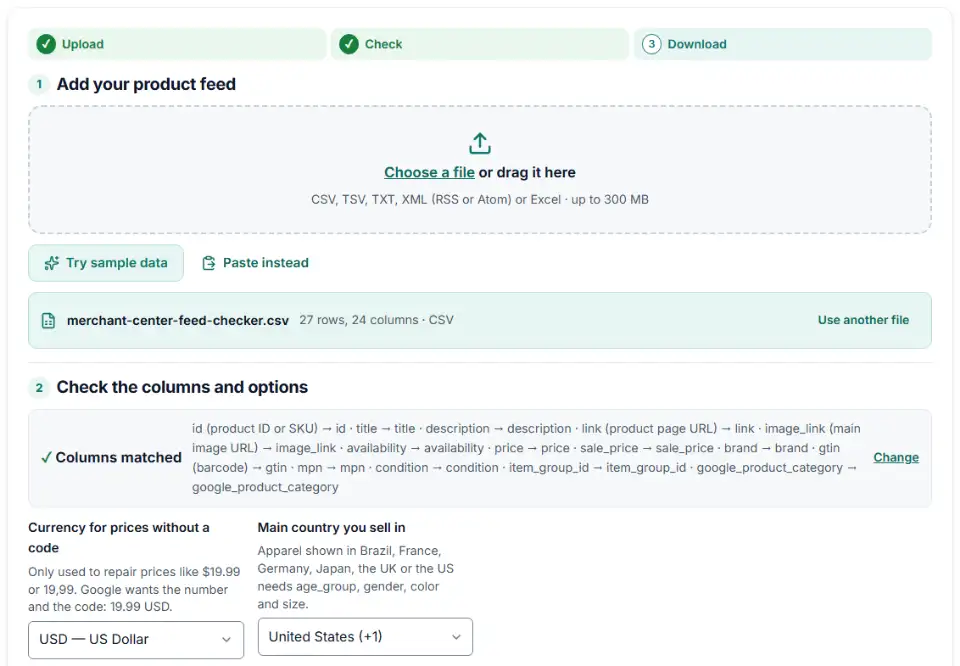
1 Add your product feed
Choose a file or drag it here
CSV, TSV, TXT, XML (RSS or Atom) or Excel · up to 300 MB
2 Check the columns and options
Rules last checked: against the official pages:
- Product data specification - Google Merchant Center Help (Google Merchant Center)
- GTIN [gtin] - Google Merchant Center Help (Google Merchant Center)
- Create a tab-delimited product data source - Google Merchant Center Help (Google Merchant Center)
- Troubleshoot my data source - Google Merchant Center Help (Google Merchant Center)
How to use the feed validator for Google Merchant Center
This feed validator for Google Merchant Center reads your whole product file and tests every row against Google's product data specification. It takes the formats people really have: a tab-delimited TXT or TSV feed, an RSS or Atom XML feed from a feed app, or a CSV or Excel sheet exported from a shop. There is no cap on the number of products.
- Load the feed. Drop the file in the box, pick it from your computer or phone, or paste rows copied from Google Sheets. Try sample data loads a small outdoor store feed full of typical mistakes.
- Check the columns. Columns named after Google attributes (
id,image_link,g:price) are found on their own. If your export says Product URL or SKU, open the column list and say which attribute each one holds. - Set the currency and country. The currency only repairs prices written without a code. The country decides whether Google's extra apparel attributes apply.
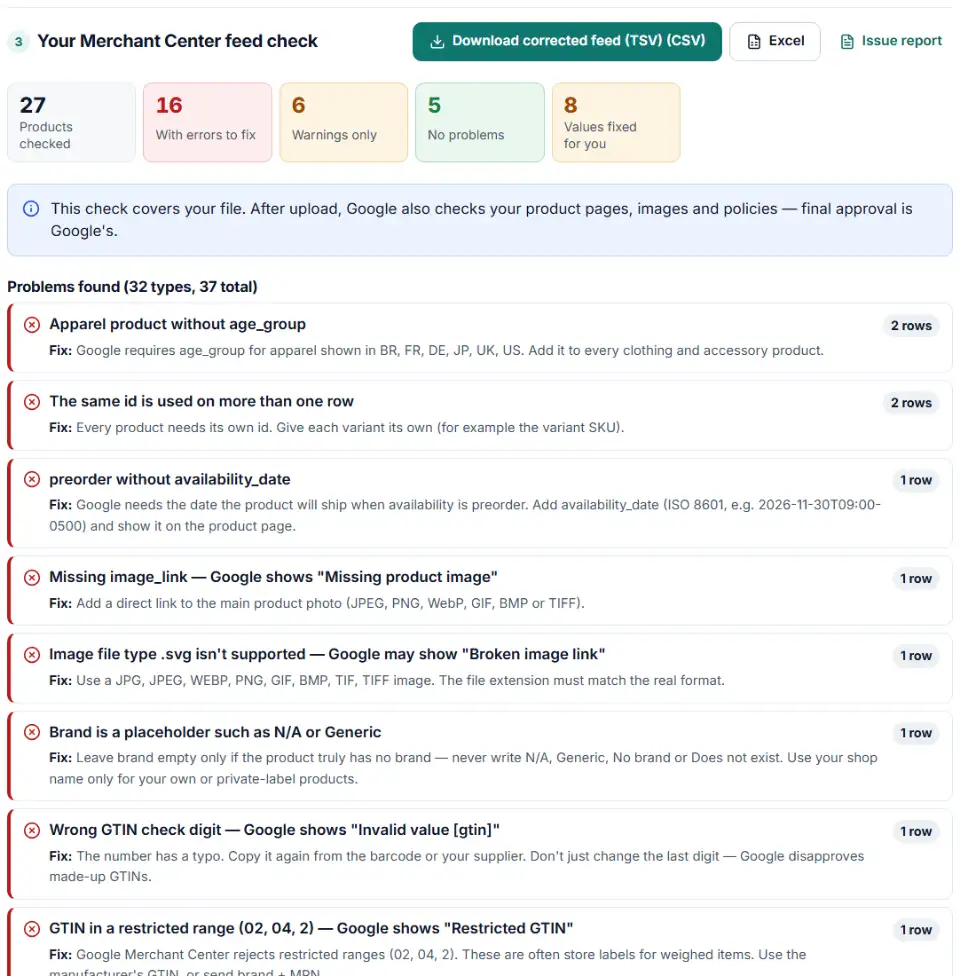
- Read the summary. Each problem type shows how many products it hits and what share of the catalog that is, so the biggest groups get fixed first. Open a problem to see its rows, values and fix.
- Download. Get the corrected tab-delimited feed, a list of products that still need you, and the problem summary to share with a developer or client.
What this feed checker for Google Shopping repairs for you
Mistakes with only one right answer are repaired and marked Fixed in download: Image Link becomes image_link, 89,99 USD becomes 89.99 USD, lost GTIN zeros come back and garbled letters (café) are restored. A missing photo or a wrong barcode is listed for you instead.
What to do next in Merchant Center
- Fix the remaining errors at the source. Correct them in your shop or sheet so the next export is clean; the products to fix file is your to-do list.
- Add the file as a data source. Go to Settings > Data sources > Add product source > Add products from a file. Choose a link Google fetches (every 24 hours by default), SFTP, or an upload from your computer.
- Re-upload after every change. An uploaded file never updates by itself, and a replacement must keep the registered file name.
- Turn on quoted fields for older sources. Values with quotes or line breaks are wrapped in double quotes. New data sources accept that; for an older one open Data source setup > Quoted fields.
- Watch Needs attention. After processing, open Products > Needs attention. Website and image checks only show up there.
Common Merchant Center feed errors and fixes
Merchant Center missing required attribute
A missing column (often id or availability) stops every product, so it shows as 100% of the catalog. Titles over 150 characters and descriptions over 5,000 are flagged too.
Merchant Center invalid price format
Prices such as $24.95, 24,95 EUR or EUR 24.95 break the rule of number, space, code. The corrected file rewrites them; a price of 0 or one that can't be read is left for you.
Merchant Center duplicate product IDs
Every row needs its own id of up to 50 characters, ideally the variant SKU. IDs that differ only in capital letters are flagged too, because Google warns they get confused.
Missing product image or broken image link
Google's image link page lists JPEG, PNG, WebP, non-animated GIF, BMP and TIFF. An SVG logo or a "no image" placeholder fails, and spaces in the address must be written as %20.
Invalid value [gtin], Restricted GTIN or Unsupported GTIN
A wrong last digit means a typo. Google refuses in-store numbers (02, 04, 2) and coupon ranges (05, 98, 99). Copy the number from the product label.
Missing sub-attribute [country] in shipping
::Standard:5.99 USD has no country. Write US::Standard:5.99 USD, or set rates under Products & store > Shipping and returns.
XML tags without the g: prefix
In an RSS or Atom feed Google ignores attributes written without g:, so <price> counts as no price. Only the feed's own elements, like <title> and <link>, may go without it.
Invalid UTF-8 encoding or unsupported file format
Google supports UTF-8, UTF-16, Latin-1 and ASCII, and rejects .xlsx, .csv, .html and .pdf product files. The corrected download is a UTF-8 .tsv file.
Frequently asked questions
What does a Google Merchant Center feed validator check?
It tests each product in your file against Google’s product data specification: required attributes, IDs, text limits, prices, availability, links, images, GTINs, brand and MPN, apparel attributes, shipping, XML prefixes and encoding. It can’t see your website, so Google’s own review still follows.
Which product attributes are required in Merchant Center?
Every product needs id, title, description, link, image_link, availability and price. Most new products also need brand and a gtin (or mpn). Used or refurbished items need condition. Apparel sold in Brazil, France, Germany, Japan, the UK or the US needs age_group, gender and color, plus size for clothing and shoes.
How should price be written in a Google Shopping feed?
As a number, a space and the ISO 4217 currency code, with a dot for decimals: 15.00 USD. Don’t use currency symbols or a decimal comma, and don’t include shipping in the price. In the US and Canada leave sales tax out; elsewhere include VAT or GST.
What are the valid availability values?
in_stock, out_of_stock, preorder and backorder (plus build_to_order for vehicles). Preorder products also need availability_date. Spellings like In Stock are rewritten for you.
Does passing this check mean Google will approve my products?
No — it means the file follows the format rules. Google still checks your product pages, images and policies; those issues appear under Products > Needs attention.
Can I check a CSV, TSV or XML feed?
Yes, all three, plus TXT and Excel. Note that Merchant Center itself only accepts .txt, .tsv and .xml product files (file guide), so the corrected download is always tab-delimited.
Is my product feed sent to your server?
No. Your browser checks the file and nothing is uploaded.
Related tools and guide
-
Check thousands of product barcodes (GTIN, UPC, EAN, ISBN) at once and catch wrong check digits and restricted codes before Merchant Center does.
GoogleMetaTikTokPinterestMicrosoft -
Convert a Shopify products CSV into a Google Shopping feed without an app: variants grouped, options mapped, bad barcodes left out and every row checked.
GoogleShopify -
Group your Google Shopping products by price range, margin or best sellers with custom labels, in a supplemental feed kept within Google's limits.
Google -
Search the official Google product taxonomy by word or ID, and bulk-map products or product types to category IDs — no daily limit.
GoogleMetaTikTok -
Bulk-build better Shopping titles by category: front-loaded details, no promo text, every variant different, ready as a supplemental feed.
GoogleMetaTikTokPinterest -
Group Merchant Center product issues, count affected products and get Google's fix steps, disapprovals first.
Google
Need help setting this up? Talk to EmproIT