Full Google Product Category List and Category Finder for Merchant Center
Search Google's full product category list (5,595 categories with IDs), or map a whole product file to the best category at once and download it as a feed column.
Product Category Finder for Google Merchant Center
- Upload
- Match
- Download
1 Add your products
Need just one category? Search the full list below the tool.
Choose a file or drag it here
Feed export, Shopify or WooCommerce export, or a list of product names or categories · up to 300 MB
2 Check the columns and options
Search the Google product category list
5,595 categories, Google taxonomy version 2021-09-21.
Rules last checked: against the official pages:
- Google product category [google_product_category] - Google Merchant Center Help (same text also served at answer/12472026 and answer/1705911) (Google Merchant Center)
- Submit attributes and attribute values - Google Merchant Center Help (Google Merchant Center)
- Google product taxonomy with IDs (en-US, plain text) (Google Merchant Center)
How to search the Google product category list with this finder
The Google product category list is the fixed set of categories Merchant Center accepts in google_product_category. This page lets you search that list and map whole files to it, using Google's official taxonomy file and the rules on the Google product category [google_product_category] page.
- Add your products. Load a feed or shop export, or paste a list of product names or of your own category names. Click Try sample data to see it work first.
- Check the columns. The product name and your own category (product_type) are what the finder reads. Add the id column to get a ready supplemental feed, and the current google_product_category to have it checked.
- Choose what to keep. Keep valid categories you already set, or ask for a suggestion on every row. Pick how confident a match must be to go into the download.
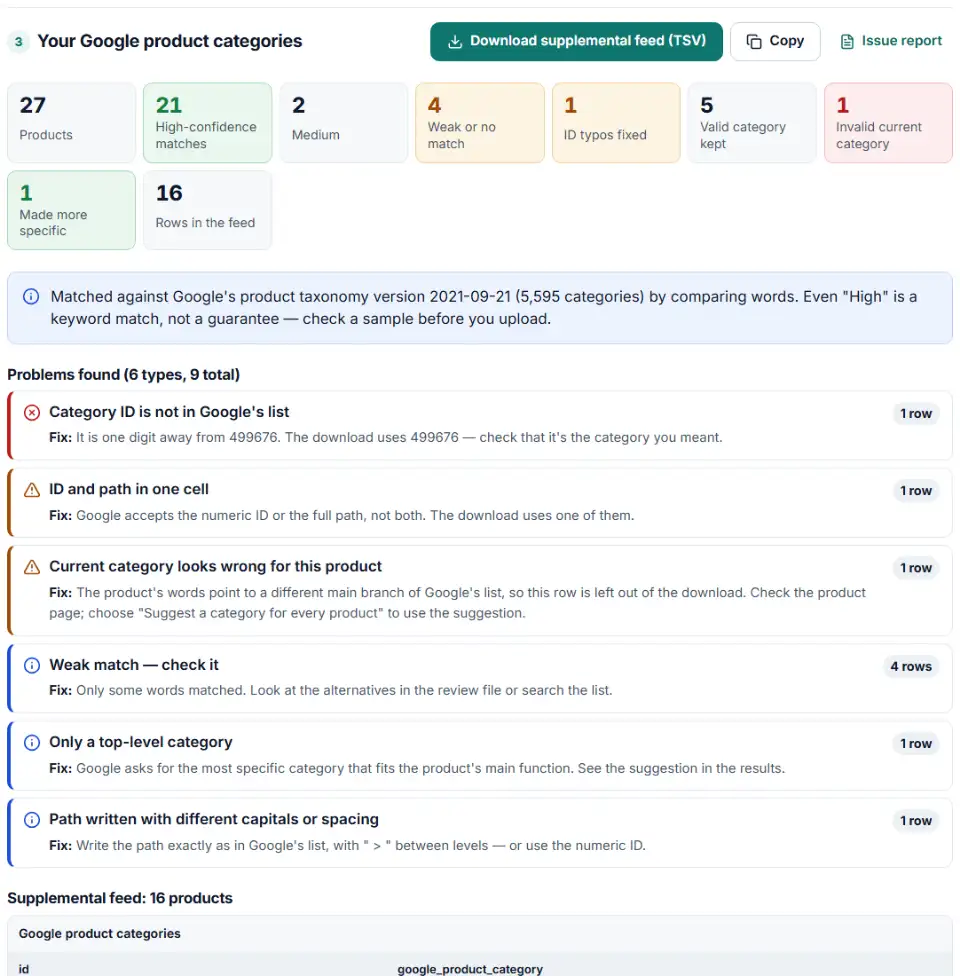
- Check the weak matches. Each product gets a confidence level and three alternatives in the review file. Search the list below the tool when none fits.
- Download. Get the supplemental feed (id and google_product_category), the review file and a table that maps each of your categories to a Google one.
Google product taxonomy with IDs: version and download
Google's file has not changed since version 2021-09-21. It holds 5,595 categories in 21 main branches, up to seven levels deep. The download above splits every path into one column per level, which is easier to filter in Excel than Google's own taxonomy-with-ids text file.
When setting the category still matters
Google assigns a category to every product on its own, so the attribute is optional. Sending it is worth it when a category has its own required attributes (clothing, mobile phones, software), when you organize Shopping product groups by category, and for alcohol. Product groups by category work in Australia, Brazil, France, Germany, Italy, the Netherlands, Norway, Sweden, Turkey, the UK and the US.
What to do next with your categories
- Fix the source when you can. In Shopify or WooCommerce, set the category on the product itself so every new export carries it.
- Or add a supplemental source. In Merchant Center open Settings > Data sources, choose Supplemental sources and Add supplemental product data, upload the TSV and link it to your main source. The tab needs the Advanced data source management add-on.
- Keep product_type as well. Your own category path stays useful for reporting and for splitting campaigns, because only you decide its levels.
- Group Shopping campaigns by category. In Google Ads, open the campaign's product groups and subdivide by Category to bid differently on each branch.
Common Google product category mistakes and fixes
Category ID not in Google's list
A typo or a lost digit gives an ID that doesn't exist. Even Google's change log once printed the alcoholic beverages category as 99676; the list says 499676. The finder checks every ID against the file and suggests a real one.
ID and path in the same cell
Copying a line from Google's text file gives values like 2271 - Apparel & Accessories > Clothing > Dresses. Google wants the ID or the path, not both. The download keeps one of them.
Old category paths from examples
Some help pages and old guides still show paths such as “Apparel & Accessories > Apparel > Dresses”. Google translates versions published after August 2011, but a typo in a path is never matched. The numeric ID avoids both problems.
Google product category vs product type
Putting your own menu path (“Sale > Summer > Dresses”) in google_product_category fails, because only Google's list is valid there. Your path belongs in product_type, where Google uses the first value for Shopping bidding and reports.
Ampersands in XML feeds
Many paths contain “&”. In an XML feed it must be written &, or the file breaks. Use the numeric ID in XML feeds to avoid this.
Taxonomy in another language
If Google's list isn't available in your feed's language, Google asks for the English path or the numeric ID.
Frequently asked questions
Where can I find the full Google product category list with IDs?
Use the search under the tool, or download the whole list as CSV or Excel with one column per level. It is Google’s official taxonomy file, version 2021-09-21, with 5,595 categories. Google publishes the same list as plain text and as an Excel file.
Should I use the category ID or the full category path?
Either one, but not both in the same cell. The numeric ID (for example 2271 for Dresses) is the safer choice: it doesn’t depend on spelling, capitals or language. The finder’s download uses IDs unless you pick paths.
How specific should my Google product category be?
As specific as the list allows for the product’s main function. Apparel & Accessories alone tells Google little; Apparel & Accessories > Clothing > Dresses (2271) is what it asks for. The finder flags products that only have a top-level category.
What is the difference between google_product_category and product_type?
google_product_category must be a value from Google’s fixed list. product_type is your own category path, written any way you like (up to 750 characters), such as Home > Women > Dresses > Maxi Dresses. Send both: the finder even uses your product_type to pick the Google category.
Has the Google product taxonomy changed recently?
No. The official file still carries the version line 2021-09-21 when we last checked it (October 19, 2026). Google says it accepts any version published after August 2011 and translates it to the latest one.
Can I map many products to categories at once?
Yes, with no daily limit. Load a feed or product export and every row gets a suggested category, a confidence level and three alternatives. It all runs in your browser, so the product file never leaves your computer.
Related tools and guide
-
Bulk-build better Shopping titles by category: front-loaded details, no promo text, every variant different, ready as a supplemental feed.
GoogleMetaTikTokPinterest -
Find missing attributes, bad prices, wrong availability values, invalid GTINs and duplicate IDs before Google disapproves them.
Google -
Group your Google Shopping products by price range, margin or best sellers with custom labels, in a supplemental feed kept within Google's limits.
Google -
Convert a Shopify products CSV into a Google Shopping feed without an app: variants grouped, options mapped, bad barcodes left out and every row checked.
GoogleShopify -
Check a Meta catalog feed for missing required fields, bad prices, unsupported availability values, wrong image types and duplicate IDs.
Meta -
Catch missing required fields, the wrong ID column, emoji in titles, unsupported image hosts and currency mismatches before TikTok rejects products.
TikTok
Need help setting this up? Talk to EmproIT