Google Shopping Title Optimization: Bulk Title Pattern Builder
Rebuild thousands of product titles at once from a pattern per category — brand, product, color, size — inside each platform's character limit, with the key details in the first 70 characters.
Shopping Title Pattern Builder for Google Merchant Center
- Upload
- Set the pattern
- Download
1 Add your product feed
Choose a file or drag it here
Merchant Center, Meta or TikTok feed export, WooCommerce export: CSV, TSV, TXT, XML or Excel · up to 300 MB
2 Check the columns and options
Rules last checked: against the official pages:
- Title [title] and structured title [structured_title] - Google Merchant Center Help (Google Merchant Center)
- Best practices for advertising clothing and accessories - Google Merchant Center Help (Google Merchant Center)
- How to fix: Additional or promotional info - Google Merchant Center Help (Google Merchant Center)
- Product data specifications for catalogs in Commerce Manager (Meta (Facebook and Instagram))
How to do Google Shopping title optimization in bulk
Google Shopping title optimization means writing each product title so shoppers see the right details first and Google can match it to searches. This builder rewrites every title in your feed from a pattern and checks the result against Google's Title [title] rules: the length limit, details first, no promotional text and a different title for every variant.
- Add your feed. Use a Merchant Center export, a catalog file or any sheet with an ID and a title. Brand, color, size, material, gender and item_group_id columns give the patterns more to work with.
- Check the columns. Headers are matched on their own. Map capacity, flavor or author to Other detail to use it.
- Pick the platform and pattern. Keep one pattern per category, or write your own with parts like
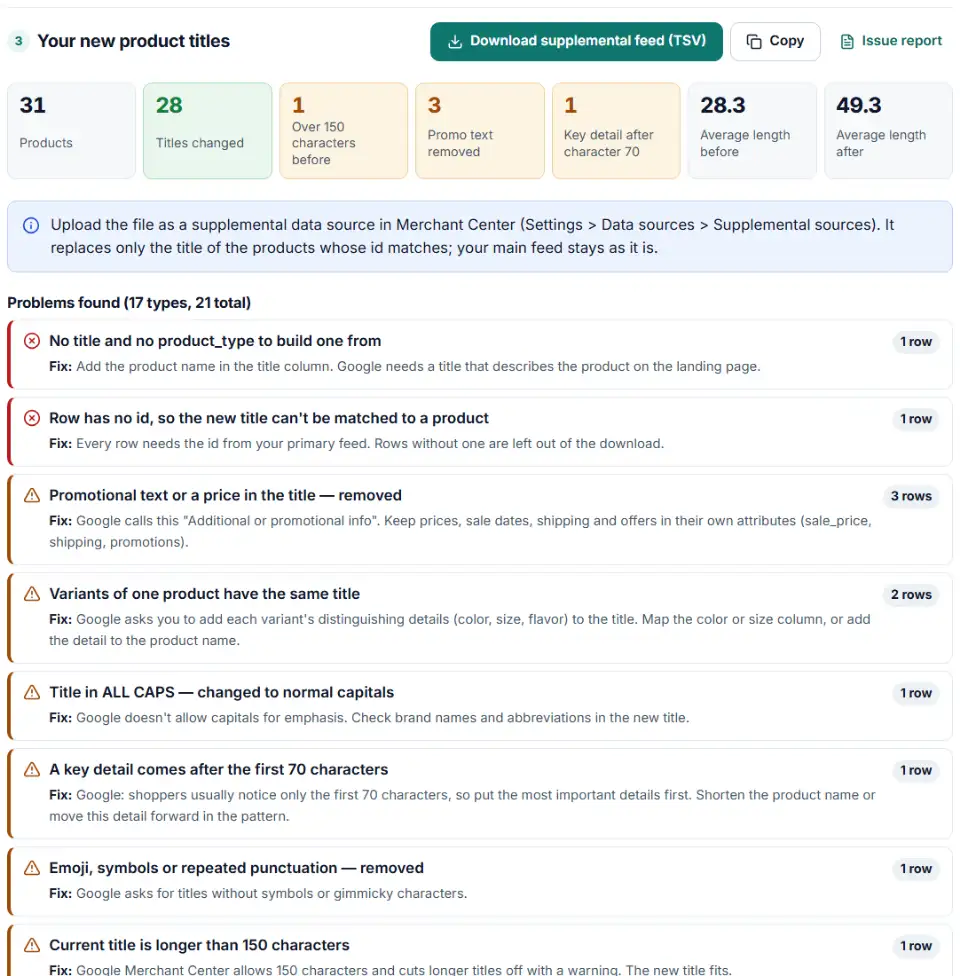
{brand} {title} - {color} - {size}. A part is skipped when the title already contains that word, so nothing is repeated. - Read the problems. See removed promo text, overlong titles, details hidden after character 70 and variants that share a title.
- Download. Get the supplemental feed (id and title) and a review sheet with old and new titles.
Google Shopping title character limit and length
Merchant Center takes up to 150 characters, but shoppers usually take in only the first 70, so the start of the title must name the product. Meta allows 200 and recommends 65 (Meta's catalog specifications); TikTok and Pinterest allow 500. When a built title is too long, the builder drops the least useful parts first and keeps color, size and brand.
Product title formula for Google Shopping, by category
Google publishes one structure, for clothing: brand, then product type, then important attributes, with gender and age group when the photo doesn't make them clear (clothing best practices). The builder's patterns for electronics, beauty, home and other categories are our own starting points, not Google rules.
What to do next: put the new titles live
- Review a sample. Open the review sheet and read twenty titles out loud. Each one should describe the exact product on its landing page, including the variant.
- Upload as a supplemental source. In Merchant Center go to Settings > Data sources > Supplemental sources > Add supplemental product data. The tab appears after you add the Advanced data source management add-on under Settings > Add-ons. Choose the file, then link it to your primary data source.
- Wait for processing. The supplemental title replaces the main title only for products with the same
id. Check a few products afterwards to see the new title in their details. - Fix the source too. Change the product names in your shop over time, so a new feed app doesn't bring the old titles back.
Common Google Shopping title errors and fixes
“Additional or promotional info”
Merchant Center shows this issue when a title or description contains text such as “Free Shipping”, “Best Price Guarantee” or “30 Day Money Back Guarantee” (Google's fix page). Remove it and describe only the product. Words like “sale” or “clearance” are only flagged, because they can be part of a product name.
Google merchant center title too long
Over 150 characters, Google cuts the title and warns you. The cut can land mid-word or remove the size, so shorten it yourself and keep the facts.
Variants with the same title
Google asks for each variant's distinguishing details in its title, plus the matching color, size or age_group attribute. If variants differ by a detail the pattern lacks, the builder adds it at the end; variants that look identical in your file are listed.
AI-written titles sent as title
Titles written with generative AI belong in structured_title, not title. If you send both, Google uses title. This builder only rearranges your own data, so its output goes in title.
Frequently asked questions
What is the character limit for Google Shopping titles?
Merchant Center accepts 1 to 150 characters in title. A longer title is cut to fit and you get a truncation warning. Shoppers usually notice only the first 70 characters or fewer, depending on screen size (Google’s title page).
What is a good product title formula for Google Shopping?
For clothing, Google suggests brand + product type + other important attributes such as gender, color, size and material, with the key details inside the first 70 characters. Google publishes no formula for other categories, so the builder offers sensible starting patterns (for example brand + product + color + size) that you can replace with your own.
Where should the most important details go in a product title?
At the start. Google’s rule is “put the most important details first”, because the end of a long title is often hidden. The builder flags titles where the brand or product type — and, for variants, the color or size — runs past character 70.
Should product titles be written in all caps?
No. Google doesn’t allow capital letters for emphasis. Capitals are fine for abbreviations and brand names; the builder rewrites shouted titles and keeps your brand’s own spelling.
Can I add sale or free shipping text to product titles?
No. Google doesn’t allow promotional text in titles, and says not to add price, sale price, sale dates, shipping, delivery dates or your company’s name. Put those in sale_price, shipping or a promotion instead. The builder removes phrases like “Free Shipping”, prices and “20% off”.
How do I update titles in bulk without changing my main feed?
Upload the file as a supplemental data source in Merchant Center. It holds only id and title, so it changes the titles of matching products and nothing else. Delete the source to go back.
Related tools and guide
-
Find missing attributes, bad prices, wrong availability values, invalid GTINs and duplicate IDs before Google disapproves them.
Google -
Search the official Google product taxonomy by word or ID, and bulk-map products or product types to category IDs — no daily limit.
GoogleMetaTikTok -
Group your Google Shopping products by price range, margin or best sellers with custom labels, in a supplemental feed kept within Google's limits.
Google -
Convert a Shopify products CSV into a Google Shopping feed without an app: variants grouped, options mapped, bad barcodes left out and every row checked.
GoogleShopify -
Check a Meta catalog feed for missing required fields, bad prices, unsupported availability values, wrong image types and duplicate IDs.
Meta -
Build a Google Merchant promotions feed for many promos at once: IDs, date ranges with time zones, codes, product filters and title rules checked.
Google
Need help setting this up? Talk to EmproIT