Promotions Feed Builder for Google Merchant Center
Turn a sheet of sales, coupon codes and offers into a Google Merchant Center promotions feed — correct IDs, date ranges, offer types and titles checked against Google's promotions rules.
Promotions Feed Builder for Merchant Center
- Upload
- Check
- Download
1 Add your promotions sheet
Choose a file or drag it here
One promotion per row: CSV, Excel, TSV or Google Sheets download · up to 300 MB
2 Check the columns and options
Rules last checked: against the official pages:
- Promotions data specification - Google Merchant Center Help (Google Merchant Center)
- Editorial requirements - Google Merchant Center Help (Google Merchant Center)
- Promotions policies - Google Merchant Center Help (Google Merchant Center)
- Eligible channel for promotion [redemption_channel] - Google Merchant Center Help (Google Merchant Center)
How to build a Google Merchant promotions feed
A Google Merchant promotions feed lists every sale and coupon you want Google to show with your products. This builder turns an ordinary sheet into that file and checks each row against Google's promotions data specification and its editorial rules for promotion titles.
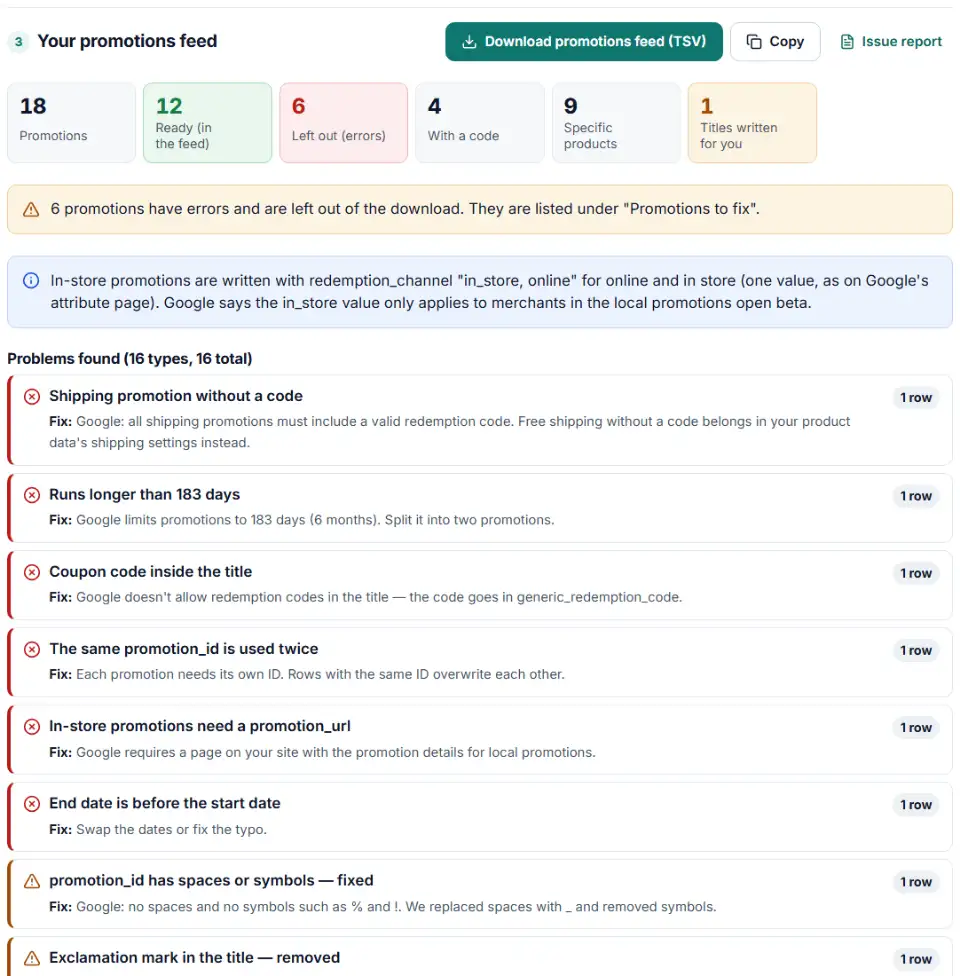
- List your promotions. One row each: title, start date, end date and the discount (20%, $10, free shipping, free gift or buy 2 get 1 free). Add a coupon code, minimum purchase or product IDs when they apply.
- Check the columns. The builder recognizes common headers such as Coupon code, Valid from or Min spend. Fix any wrong match in the list.
- Set country, currency and time zone. They turn plain dates into Google's date range and plain numbers into amounts like
10.00 USD. - Fix what's flagged. Promotions with errors, or with an offer the builder can't read for sure, are left out of the download and listed in a file to fix. Warnings point to things reviewers often reject.
- Download. Get the tab-separated promotions feed, plus a product file when a promotion lists product IDs.
Merchant Center promotions feed template: the columns
The file starts with Google's seven required headers. The builder adds only the optional ones your promotions use: generic_redemption_code for codes, percent_off or money_off_amount for the value, minimum_purchase_amount, the brand or product_type filter, and coupon_value_type, which Google says speeds up review. Promotions shown on more than one destination get one promotion_destination column each, as the specification asks. Online and in store is one redemption_channel value, in_store, online, as on Google's redemption channel page (its local promotions page spells it online_and_in_store). Google says in-store values only apply to merchants in the local promotions open beta.
Promotion effective dates format
Google wants start and end in one cell, with times and a time zone offset: 2026-11-27T00:00:00-05:00/2026-11-30T23:59:59-05:00. The builder works out the offset for each date, so a promotion that crosses a daylight saving change still starts and ends at midnight your time.
What to do next in Merchant Center
- Register the source once per country. Click Promotions in the left menu, open the Add promotion dropdown and choose Add promotion source. Pick the target country and click Continue.
- Choose how to send it. Name the source, then pick Upload, Scheduled fetch or Google Sheets. Upload the TSV, or paste the copied rows into a sheet.
- Upload the product file too. If you got one, add it as a supplemental source of your product data, so the products carry their
promotion_id. - Wait for review. Plan for one to three days: Google reviews each promotion close to its start time.
Common merchant promotion errors and fixes
Merchant promotion disapproved for the title
Reviewers compare the title with your checkout. It must state the exact value with the currency, what it applies to, any minimum purchase and whether it's only for new customers. Generic titles such as “Spring shoe sale”, exclamation marks and capitals for emphasis are rejected.
Coupon code in the title
“Use code SAVE15” in long_title breaks the rules. Put the code in generic_redemption_code and keep the title about the offer.
“Up to” in a product promotion
For promotions mapped to products, Google doesn't allow ceiling values. Write the lowest discount instead, such as “$10+ off”.
Promotion longer than six months
The effective dates can cover 183 days at most. Split a year-round offer into two promotions with different IDs.
Free shipping without a code
Every shipping promotion needs a redemption code. Free shipping that applies to everyone belongs in your shipping settings, not in a promotion.
Discount below the minimum
Google's policy asks for at least 5% off the current price, or USD 5 in local currency, whichever is lower. Free gifts are exempt, and 100% off is not allowed.
In-store promotion without a page
Local promotions need promotion_url, a page on your site that shows the same terms, and store_applicability. The builder sets all stores unless you limit it in Merchant Center.
Frequently asked questions
What is a Google Merchant promotions feed?
A separate data source in Merchant Center that lists your sales and coupon offers, one promotion per row. Once Google approves a promotion, it can show with the matching products in Shopping ads and free listings. The promotions source sits beside your product data source in the same account.
Which columns does a promotions feed need?
Seven are required: promotion_id, product_applicability, offer_type, long_title, promotion_effective_dates, redemption_channel and promotion_destination. A code promotion also needs generic_redemption_code, and in-store promotions need promotion_url and store_applicability (Google’s specification).
How do I write promotion start and end dates?
As one value: start and end in ISO 8601 with a time zone offset, joined by a slash, for example 2026-11-27T00:00:00-05:00/2026-11-30T23:59:59-05:00. A promotion can run for at most 183 days. The builder writes this for you from ordinary dates and your time zone.
How do I apply a promotion to only some products?
Set product_applicability to specific_products, then either add filters such as brand or product_type to the promotion, or put the promotion_id on the products in your product data. The builder does both: filters go into the promotions feed, and lists of product IDs become a small supplemental file with id and promotion_id.
When should I use a feed instead of the promotion builder?
Merchant Center’s promotion builder is fine for one or two offers. A feed is faster when you run many promotions or codes, or plan a whole season at once.
Why is my promotion not showing on Google?
Each promotion goes through a policy review and a product review, usually within 24 hours of its start time and sometimes up to 72 hours (Google’s upload guide). If it’s rejected, check the title rules, the minimum discount and the dates first — those cause most problems.
Related tools and guide
-
Group your Google Shopping products by price range, margin or best sellers with custom labels, in a supplemental feed kept within Google's limits.
Google -
Find missing attributes, bad prices, wrong availability values, invalid GTINs and duplicate IDs before Google disapproves them.
Google -
Bulk-build better Shopping titles by category: front-loaded details, no promo text, every variant different, ready as a supplemental feed.
GoogleMetaTikTokPinterest -
Build a local inventory feed from your stock sheet: one row per product per store, store codes matched to Business Profile, availability from quantity.
Google -
Search the official Google product taxonomy by word or ID, and bulk-map products or product types to category IDs — no daily limit.
GoogleMetaTikTok -
Group Merchant Center product issues, count affected products and get Google's fix steps, disapprovals first.
Google
Need help setting this up? Talk to EmproIT