Local Inventory Feed Builder for Google Merchant Center
Turn any store stock sheet into a Google Merchant Center local inventory feed — store codes, availability, quantity, price and pickup fields checked against Google's local inventory specification.
Local Inventory Feed Builder for Google Merchant Center
- Upload
- Check
- Download
1 Add your stock and stores
File 1 is required. Add file 2 to check every store code exactly against your Business Profiles.
1. Your stock sheet
Choose a file or drag it here
POS or inventory export: one row per product per store, or one quantity column per store · up to 300 MB
2. Your store codes (optional)
Choose a file or drag it here
Business Profile location export or a list of store codes · up to 300 MB
2 Check the columns and options
Rules last checked: against the official pages:
- Local inventory data specification - Google Merchant Center Help (Google Merchant Center)
- Store code [store_code] - Google Merchant Center Help (Google Merchant Center)
- How to upload your local inventory data to Merchant Center - Google Merchant Center Help (Google Merchant Center)
- Pickup cost and minimum order values will be required in the United Kingdom, Switzerland and all EEA countries for in store products enabled for pickup - Google Merchant Center Help (Google Merchant Center)
How to make a Google Merchant Center local inventory feed
A Google Merchant Center local inventory feed tells Google which store has which product, so shoppers nearby see “in stock” in local inventory ads and free local listings. This builder turns your stock export into that file and checks it against Google's local inventory data specification.
- Add your stock sheet. One row per product per store, or one quantity column per store such as
Qty Store-DT01— both work. - Add your store codes. Optional: a Business Profile list lets the builder check every code and fix capital letters.
- Check the columns. Map the id, store and quantity, plus status, price and pickup columns if you have them.
- Choose the defaults. Set the currency and, if you offer store pickup, the pickup method and pickup time for rows that don't say.
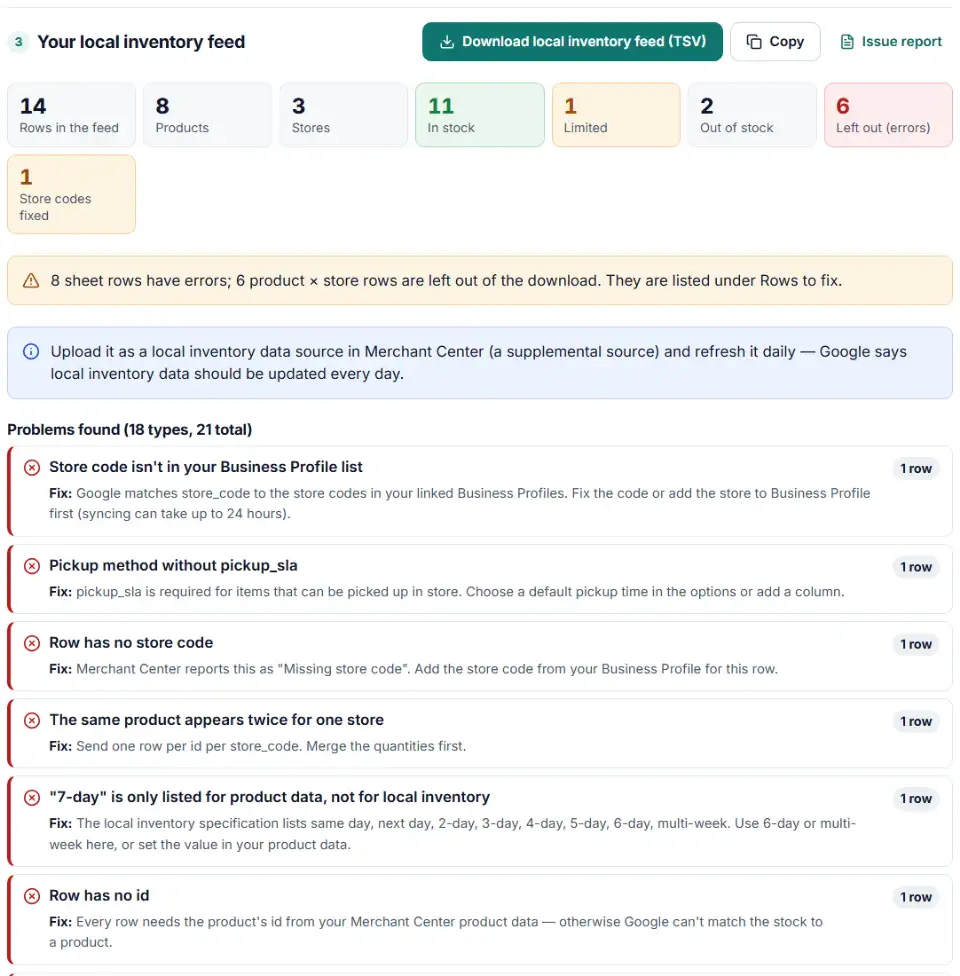
- Download. Get the tab-separated feed with one row per product per store. Rows with errors are left out and listed in a separate file to fix.
Local inventory feed availability values and quantity
Google reads availability and quantity together and uses the lower one. When your sheet has only counts, the builder sets availability from Google's classes. Negative stock becomes 0, and “5+” becomes 5.
Local inventory feed pickup method values
Google spells pickup values in two ways: the local inventory specification writes ship to store and same day, while the local product data specification writes ship_to_store and same_day and also lists 7-day. This builder writes the local inventory specification's values and flags 7-day, which that page doesn't list. The older instore_product_location attribute isn't in the current specification, so it isn't offered.
What to do next in Merchant Center
- Turn on local use of your products. Open Settings > Data sources, select your product source and, in its setup, choose to use the product data for local and online stores.
- Add the inventory source. Under Settings > Data sources > Supplemental sources, add a local inventory data source. Upload the file once or host it so Google fetches it every 24 hours.
- Wait for stores to sync. After you link Business Profile or change a store code, allow up to 24 hours before uploading inventory. Products can take up to 2 days to appear.
- Refresh it daily. Export stock each night and upload the new file, or replace the hosted file.
Common local inventory feed errors and fixes
“Missing store code”
A row has no store_code, so Google can't place the product in a store. Fill it in from Business Profile; rows without one are listed.
Local inventory feed store code not matching
Store codes are case-sensitive: store-hb02 and Store-HB02 are different stores to Google. Stray spaces break the match too. With your store list loaded, the builder fixes capital letters and lists codes that don't exist in Business Profile.
“Missing inventory data”
Google has a product enabled for local use but no inventory row for it. Usually the id differs from the product data, a store code is wrong or the Business Profile link is missing. If you don't sell in stores at all, remove the Local inventory ads add-on.
Unknown availability values
Words like “backorder” or “yes” aren't accepted. Use one of Google's four values in English; the builder converts common spellings and falls back to the quantity.
pickup_sla missing or not allowed
Every item that can be picked up needs a pickup time. 7-day appears only on the product data page, so use 6-day or multi-week in local inventory.
pickup_cost and minimum_order_value in the UK, Switzerland and EEA
From September 30, 2026, if your website charges for pickup or sets a minimum order, Google needs pickup_cost and minimum_order_value for in-store products enabled for pickup in these countries (Google's announcement). Google's pickup cost page asks you to send pickup_cost in your product data source, not per store, so this builder warns you and leaves it out of the local inventory file.
Frequently asked questions
What is a local inventory feed in Google Merchant Center?
A file that tells Google what each of your stores has in stock: one row per product per store, with the store code, the product’s id and its availability. Merchant Center adds it as a supplemental data source for local inventory ads and free local listings.
Which columns does a local inventory feed need?
store_code, id and availability are required. quantity and price are optional but recommended; Google’s upload guide lists them too. Add sale_price with sale_price_effective_date for store sales, and pickup_method with pickup_sla for store pickup (specification).
Where do I find my store codes?
In your Business Profiles (Business Profile Manager, the store code in each location’s advanced settings) or in Merchant Center on a product’s details, in the Stores table. Any mix of letters and numbers can be a code, but it must match exactly, capital letters included.
What availability values can a local inventory feed use?
in_stock, limited_availability, on_display_to_order and out_of_stock, in English with underscores. If you send a quantity too, Google uses the lower of the two: 3 or more counts as in stock, 1–2 as limited and 0 as out of stock.
How often should I update my local inventory feed?
Every day. Google says local inventory data should be refreshed daily, and a hosted file is fetched every 24 hours.
Do I need pickup fields for local inventory ads?
Only if you offer store pickup. Since September 1, 2024 pickup_method is optional, but pickup_sla is required for items that can be picked up. In the UK, Switzerland and the EEA, pickup_cost and minimum_order_value are also required from September 30, 2026 when your website charges for pickup or sets a minimum order.
Related tools and guide
-
Find missing attributes, bad prices, wrong availability values, invalid GTINs and duplicate IDs before Google disapproves them.
Google -
Build a Google Merchant promotions feed for many promos at once: IDs, date ranges with time zones, codes, product filters and title rules checked.
Google -
Turn your store list into a Google Business Profile bulk upload sheet, with store codes, addresses, phones, categories and opening hours checked.
Google -
Group your Google Shopping products by price range, margin or best sellers with custom labels, in a supplemental feed kept within Google's limits.
Google -
Convert a Shopify products CSV into a Google Shopping feed without an app: variants grouped, options mapped, bad barcodes left out and every row checked.
GoogleShopify -
Group Merchant Center product issues, count affected products and get Google's fix steps, disapprovals first.
Google
Need help setting this up? Talk to EmproIT