Custom Audiences Formatter for X Ads (Twitter)
Turn any contact export into X list custom audience files: emails, E.164 phones, @handles, user IDs and device IDs, each in its own file, plain or SHA-256.
Custom Audience Formatter for X Ads
- Upload
- Check
- Download
1 Add your contact list
Choose a file or drag it here
CSV, Excel, TSV or TXT · up to 300 MB
2 Check the columns and options
Rules last checked: against the official pages:
- List Custom Audiences (X Help Center) (X (Twitter) Ads)
- Audiences - X Ads API (normalization and hashing) (X (Twitter) Ads)
- How to change your X username (X Help Center) (X (Twitter) Ads)
How to prepare lists for X custom audiences
X custom audiences built from a list can match five kinds of identifiers, and each one has its own format rule on X's List Custom Audiences help page. Phones need E.164 with a plus sign, handles must lose the @, IDFAs must be lowercase. This tool applies those rules to a messy export, sorts each identifier into its own file, and can hash every line with SHA-256 the way X's Ads API documentation describes.
- Add your list. An event sign-up sheet, a CRM export or a spreadsheet of followers you collected. Use Try sample data to see every check at work.
- Check the columns. Headers such as
Twitter Username,Twitter IDorDevice IDare picked up. Profile links likex.com/nameare fine in the handle column. - Set the default country for phone numbers without a country code. A country column, if you have one, wins.
- Choose plain or hashed, and the file type. Plain text is the simplest: X hashes it during the upload.
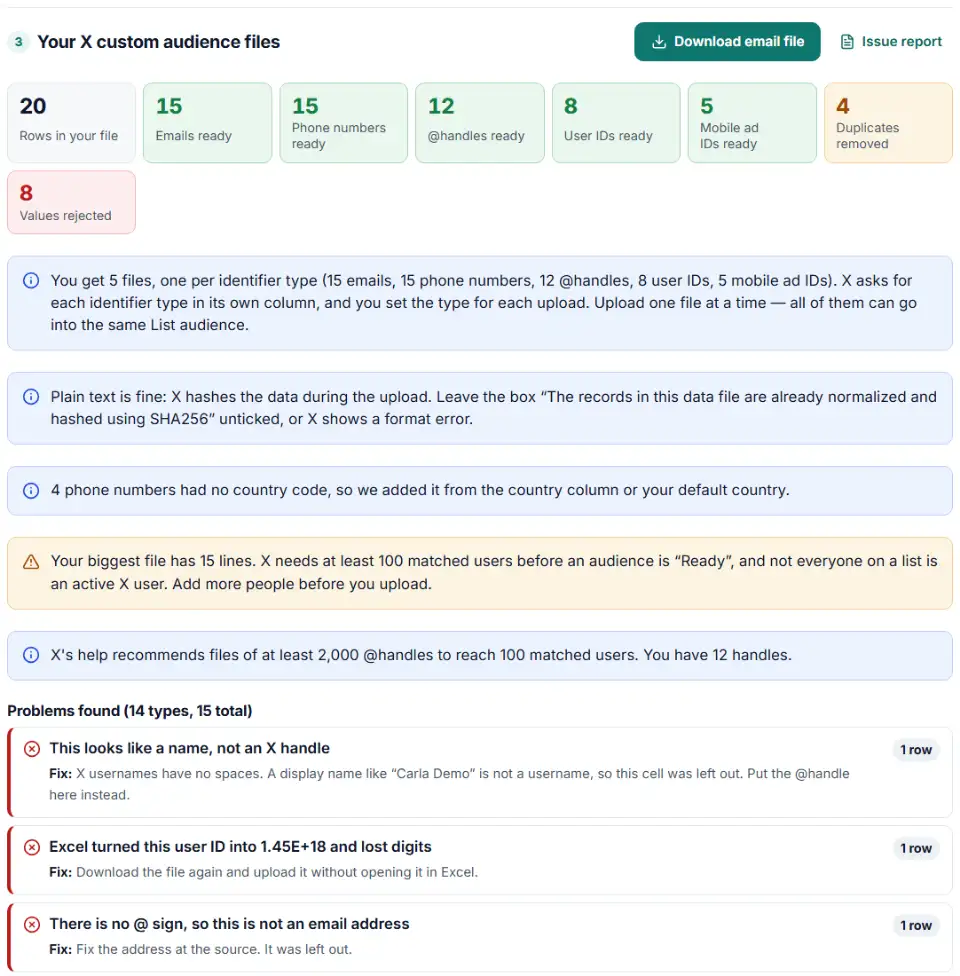
- Download one file per identifier type. Each has one value per line and no header row.
How each identifier is written
| Identifier | In your export | In the X file |
|---|---|---|
| [email protected] | [email protected] | |
| Phone | (617) 555-0123 | +16175550123 |
| @handle | https://x.com/ben_sample?s=20 | ben_sample |
| User ID | 1450000000000000002 | 1450000000000000002 |
| IDFA / AdID | 4B61639E-47CC-… | 4b61639e-47cc-… |
| Android ID | AF3802A465767E36 | af3802a465767e36 |
Upload the files in X Ads
- Open the Audiences page, click Create audience and choose List.
- Enter an audience name and, if you like, a description.
- Drag in the first file (or browse to it) and press Next when it shows in the upload box. For a hashed file, tick “The records in this data file are already normalized and hashed using SHA256”.
- Review the data and set the identifier type for the column, for example Email or Phone number.
- Keep the browser window open until the upload ends. Add the other files to the same audience later from the drop-down next to it in the Audiences tab — one file at a time.
In a campaign, open the Audiences part of Targeting and choose to include or exclude the list. Only audiences marked “Ready” can be selected.
X custom audience errors and fixes
“One or more pre-hashed records is not in the correct format”
This appears when the hashing checkbox and the file do not agree: a plain file uploaded with the box ticked, or a hashed file without it. X also lists other causes: a file type other than .csv, .tsv or .txt, two identifier types in one column, or gaps and missing rows. Our files avoid all of them.
X custom audience too small
Fewer than 100 active X users matched. Combine smaller lists into one bigger file, add more identifiers per person (an email and a phone and a handle all count), and delete the small audience before you upload the larger one. X's older API FAQ still mentions 500 users; the current help page says 100.
X custom audience phone number format
X asks for E.164: a plus sign, the country code, then the number with no spaces. 06 12 34 56 78 from a French customer becomes +33612345678. Numbers that cannot be real for their country are rejected and listed.
Names, links and broken handles
CRMs often store a full profile link, or a person's name in the “Twitter” field. X wants only the username, without @. The tool pulls ben_sample out of https://x.com/ben_sample?s=20 and jack out of an intent/user?screen_name=jack link. It rejects anything that cannot be a username under X's username rules: names with spaces like “Carla Demo”, dots or dashes, more than 15 characters, emails, and links such as /search or /home.
User IDs destroyed by Excel
X user IDs are long numbers. Excel shows them as 1.45E+18 and keeps only 15 digits, so the real ID is gone. Those rows are rejected: export the IDs again with the column set to Text.
Very large uploads
X suggests splitting files over 4 GB into smaller uploads to stay within your browser's limits. The tool does that split for you.
Frequently asked questions
What identifiers can I upload to X custom audiences?
Email addresses, phone numbers, X @usernames, X user IDs and mobile advertising IDs (iOS IDFAs, Google advertising IDs and Android IDs). Files can be .csv, .tsv or .txt.
How many matched users does an X custom audience need?
At least 100 X users. Until then the audience shows “Audience too small” and cannot be picked in a campaign. Once 100 people match, the status changes from “Processing” to “Ready”.
How do I hash emails and handles for X?
Normalize first, then hash each line with SHA-256 (no salt) and keep the hash in lowercase hex. For emails: remove spaces and lowercase. For handles: drop the @, remove spaces and lowercase, so @AdsAPI becomes adsapi. You do not have to hash at all: X hashes plain files during the upload.
Why does my X audience say too small?
Fewer than 100 active X users were matched. X suggests adding more information to the file, combining two small lists, or uploading a large list of @handles — at least 2,000. Delete the small audience and upload the bigger file to start matching again.
How long does X take to process a list?
Matching can take up to 48 hours. The audience may become selectable before it is finished, and its size keeps updating until processing ends.
Are X custom audiences the same as Twitter tailored audiences?
Yes. Tailored audiences was the older Twitter name; today the feature is called custom audiences in X Ads, and an uploaded list is a List custom audience. The file rules on this page are the current ones.
Related tools and guide
-
Get a health score for a customer list, fix email typos in one click and send the clean list to the Google, Meta or TikTok formatter.
GoogleMetaTikTok -
Turn messy phone numbers into E.164 in bulk, with the country code added and invalid numbers flagged before you upload.
GoogleMetaTikTok -
Hash emails and phones the way Google and Meta want, and check a pre-hashed file for hashes that will never match.
GoogleMeta -
Turn a customer export into Reddit's custom audience file, with emails cleaned Reddit's way and hashed and mobile ad IDs in the right case.
Reddit -
Turn one messy export into Snap-ready email, phone and mobile ad ID files, plain or SHA-256.
Snap -
Turn a CRM or store export into a Facebook custom audience CSV with Meta's column names, country codes and optional hashing.
Meta
Need help setting this up? Talk to EmproIT