Consent Mode v2 Code Generator for gtag.js and GTM
Generate gtag consent mode v2 default and update code for your banner — or paste your head code to check the order and the four v2 signals.
Consent Mode v2 Code Generator for Google Tags
1 Generate or check
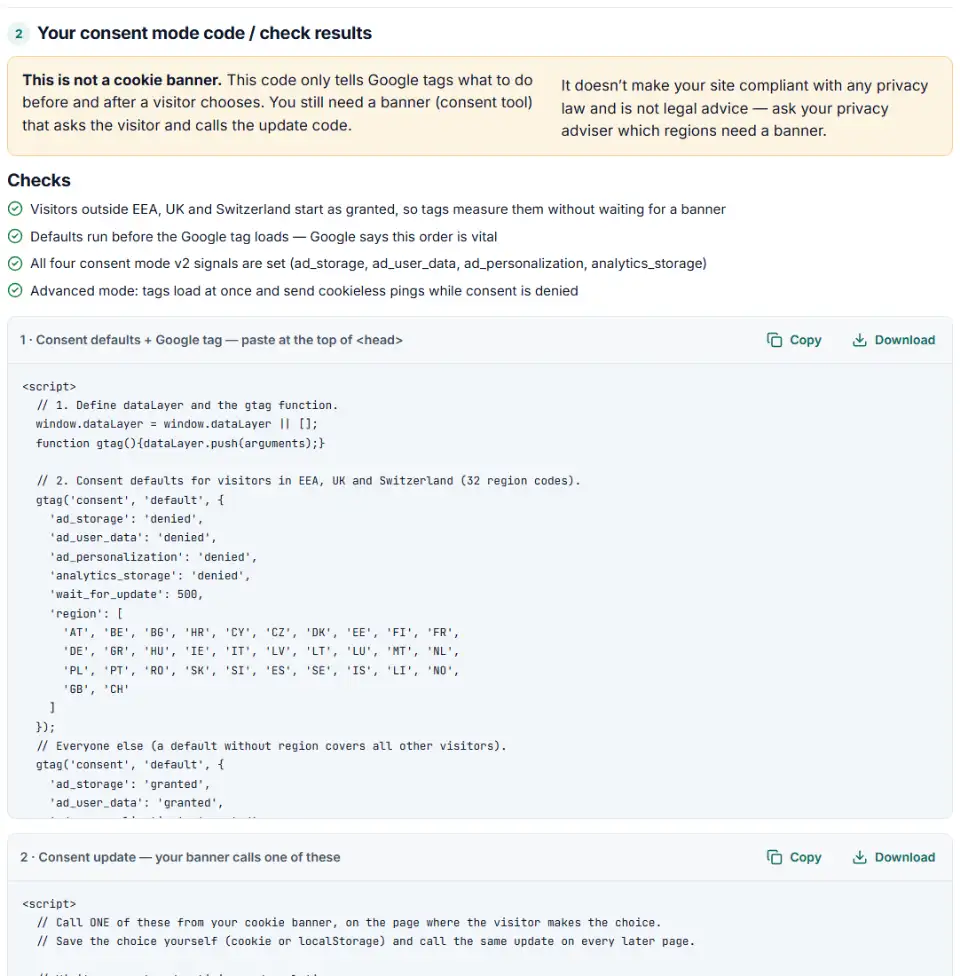
2 Your consent mode code / check results
Fill in the settings above — your result appears here instantly.
Rules last checked: against the official pages:
- Set up consent mode on websites - Tag Platform (Advanced and Basic tabs) (Google tag (gtag.js))
- About consent mode - Google Ads Help (Google tag (gtag.js))
- Tag Manager consent mode support (Google tag (gtag.js))
How to use the gtag consent mode v2 generator
This gtag consent mode v2 tool writes the two pieces of code Google asks for: the default that runs before your tags, and the update your banner sends when a visitor chooses. Every setting follows Google's Set up consent mode on websites guide. It also checks code you already have.
- Pick how your tags are installed: the Google tag in your page code, Tag Manager or a Shopify theme.
- Choose basic or advanced. Advanced keeps conversion modeling working while visitors haven't answered. Basic sends nothing until they accept.
- Set the regions. The default preset starts EEA, UK and Swiss visitors as denied and everyone else as granted. Or type your own list.
- Copy both code boxes. Box 1 goes at the top of the head on every page. Box 2 holds the functions your banner calls after a click.
- Check an existing site. Switch to Check my code and paste your head code to see each command in order, with fixes.
What to do next: install the code
Plain HTML site
- Paste box 1 right after
<head>, above any other script, and remove older Google tag snippets. - Call
consentGrantedAll()orconsentDeniedAll()from the banner's buttons. Store the answer and repeat the call on later pages — consent mode remembers nothing.
WordPress
- A Google-certified consent plugin can send the signals itself.
- Otherwise print box 1 from a
wp_headaction with priority1in a child theme'sfunctions.php(lower numbers run earlier). - Hook box 2 into your banner plugin's accept and decline events.
Shopify
- Choose Shopify theme above. Duplicate the theme, open Online Store › ⋯ › Edit code, and paste box 1 and then box 2 at the top of the head in
theme.liquid. - Box 2 listens for Shopify's
visitorConsentCollectedevent and reads the saved choice through the Customer Privacy API, so Shopify's own cookie banner sends the update. - Theme code doesn't track checkout. For checkout events, use an app pixel or a custom pixel — our custom pixel code generator for Shopify adds the consent signals.
Google Tag Manager
- Best: add your consent tool's template from the Community Template Gallery and fire it on Consent Initialization - All Pages, which fires before every other tag.
- No template? Paste box 1 on the page directly above the container snippet. Don't use a Custom HTML tag for consent.
- Leave Google tags (Analytics, Ads, Floodlight, Conversion Linker) on Consent Settings › Not set: they check consent themselves.
- Using url_passthrough? Also turn it on in the Conversion Linker tag, if you have one.
Test with Tag Assistant as an EEA visitor: the default must appear before the first tag fires. Later, each conversion action's Diagnostics tab in Google Ads shows its consent status.
Common consent mode v2 errors and fixes
Consent mode not detected: the default comes after the Google tag
If gtag('config') or the Tag Manager snippet runs first, Google tags fire with no consent state. Move the default to the very top of the head.
Missing ad_user_data and ad_personalization
Older banners only set ad_storage and analytics_storage. Tag Manager Help says ad_user_data is needed for measurement such as enhanced conversions and tag-based conversion tracking, and EEA Customer Match data needs both v2 signals granted. Add them to the default and to every update.
gtag consent update not working on the page where the visitor clicked
A common issue: the update only fires on the next page, or while the page unloads, so the request is canceled. Call the update immediately on the same page.
"UK" in the region list
Region codes follow ISO 3166-2, where the United Kingdom is GB. A list with UK silently matches nobody, so British visitors fall back to your global default.
Blocking Google tags with consent triggers in GTM
Old setups add blocking triggers or "Require additional consent" to Google tags. Google says this throws away conversion and behavioral modeling. Keep those tags on Not set; add extra consent checks only to non-Google tags.
Frequently asked questions
What is Consent Mode v2?
It is how your site tells Google tags what a visitor agreed to. Version 2 (November 2023) added ad_user_data and ad_personalization to ad_storage and analytics_storage. Each signal is granted or denied.
Is Consent Mode v2 mandatory?
Google requires advertisers who measure or personalize ads for users in the EEA to collect consent and share consent signals with Google. On a website, consent mode is how those signals reach Google tags. Google’s EU user consent policy covers the EEA, the UK and Switzerland.
What is the difference between basic and advanced consent mode?
In basic mode, Google tags don’t load until the visitor accepts. In advanced mode, tags load at once with denied defaults and send cookieless pings until consent, which allows an advertiser-specific conversion model.
Where does the consent default code go on my page?
At the top of the <head>, on every page, before the Google tag or Tag Manager snippet and before any config or event command. Google calls the order vital: out of order, the defaults don’t work.
What do ad_user_data and ad_personalization do?
ad_user_data is consent to send user data to Google for advertising — when denied, enhanced conversions data and user IDs aren’t used for ads. ad_personalization is consent for personalized advertising. EEA Customer Match data needs both granted.
Why is my gtag consent update not working?
Usually it runs on the next page instead of the one where the visitor clicked, runs as the page unloads, uses 'Granted' instead of 'granted', or runs before any default. Check my code shows the order.
Is this tool a cookie banner?
No. It writes the consent mode code only. You still need a banner or consent tool that asks the visitor, stores the answer and calls the update. Google notes that consent mode neither shows a banner nor saves choices.
Related tools and guide
-
Get Google Ads conversion tracking code with the real order value and ID, for a thank-you page, WooCommerce or Tag Manager, and check code you have.
Google -
See every tag in a Google Tag Manager export in one Excel file, with unused, paused and outdated items flagged and two versions compared.
Google -
Build GA4 ecommerce code for carts and purchases, and check code you already have for old event names, text prices and totals that don't add up.
Google -
Get custom pixel code for Shopify that sends checkout and cart events to Meta, Google, TikTok and Pinterest, plus a checker for wrong event names.
ShopifyMetaGoogleTikTokPinterest -
Get Google Ads enhanced conversions code that sends the buyer's email, phone or address with each conversion, for the Google tag or Tag Manager.
Google -
Get Meta pixel code for purchases, leads and other events, with order value and a matching Conversions API event so no sale is counted twice.
Meta
Need help setting this up? Talk to EmproIT