Enhanced Conversions (Web) Code Generator for gtag and GTM
Build the gtag('set', 'user_data') code or the Tag Manager variable for enhanced conversions for web — with Google's exact field names, E.164 phones and blank fields left out — or check the code you already have.
Enhanced Conversions Code Generator for Google Ads
1 Build or check
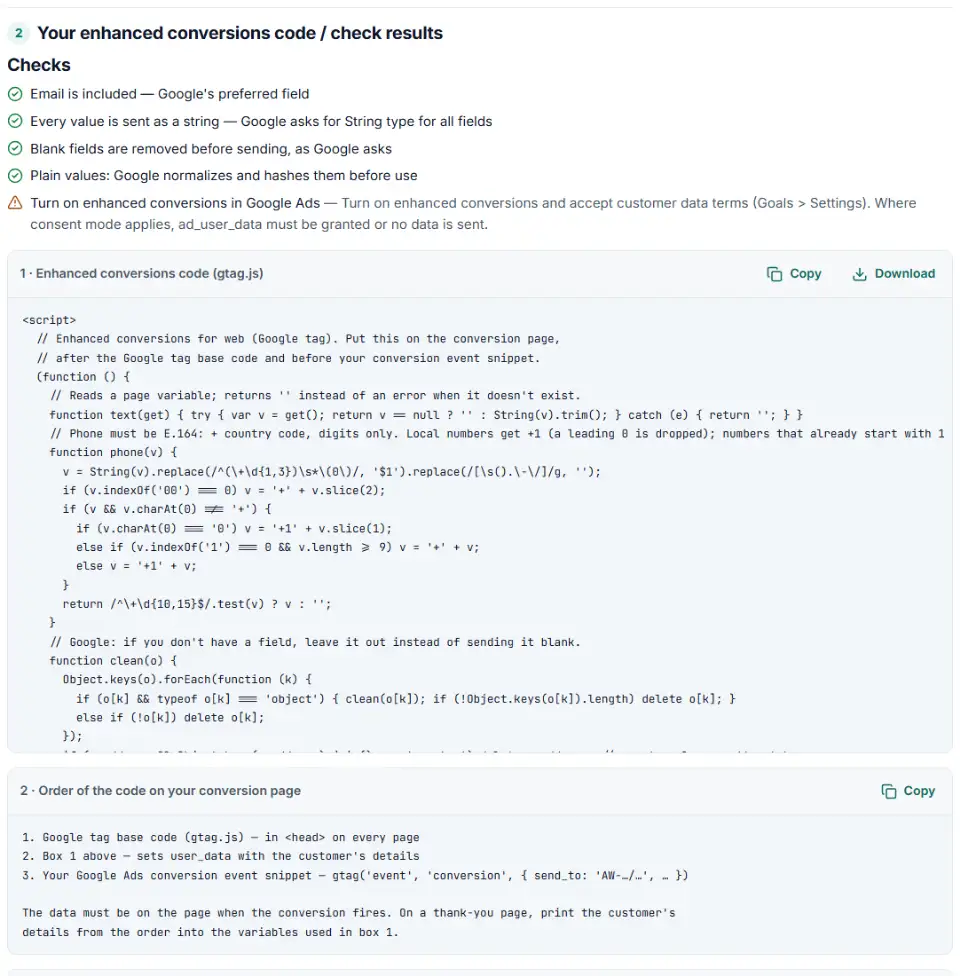
2 Your enhanced conversions code / check results
Fill in the settings above — your result appears here instantly.
Rules last checked: against the official pages:
- Set up enhanced conversions for web using the Google tag (Google tag (gtag.js))
- Set up enhanced conversions for web using Google Tag Manager (Google tag (gtag.js))
- About enhanced conversions (Google tag (gtag.js))
How to use the gtag enhanced conversions generator
Gtag enhanced conversions need one extra piece of code on the conversion page: a user_data object with the customer's email, phone or address. This generator writes it with the key names and formats from Google's page Set up enhanced conversions for web using the Google tag.
- Pick your setup: the Google tag in your page code, or Google Tag Manager.
- Say where the data lives. On a thank-you page it is usually in JavaScript variables printed from the order. On a lead form that fires the conversion when it is sent, the code reads fields such as
#emailat the moment of submit. - Fill only the fields you collect. An email alone is enough. Address matching needs first name, last name, postal code and country together.
- Choose the country. It becomes the ISO code, and phones typed without + get its country code.
- Copy and check. Paste box 1 above the conversion snippet, or use Check my code on an existing setup.
What to do next: install the code and turn the feature on
Switch the feature on in Google Ads under Goals › Settings and accept the customer data terms — until then Google ignores the data. Then add the code where your conversion fires:
Plain HTML
- Have your server print the customer's details into JavaScript variables on the confirmation page, with the names you typed above.
- Paste box 1 between the Google tag and the
gtag('event', 'conversion', …)line — user data must be set first.
WordPress and WooCommerce
- If a Google plugin already sends enhanced conversions, use its setting instead of adding a second source.
- WooCommerce: add the code to the order-received page with a child theme or a snippets plugin, filled from the order's billing email and phone. For contact forms, use the field IDs your form plugin prints.
Shopify
- Shopify recommends Google's own Google & YouTube app for Google tags — check what it sends first.
- The new Thank you page runs no extra scripts, so code goes in a custom pixel (Settings › Customer events). Its
checkout_completedevent holdsevent.data.checkout.emailand the phone, already in E.164.
Google Tag Manager
- Create a Custom JavaScript variable with box 1 from the GTM version of this tool.
- In your Google tag, add the event parameter
user_datawith a User-Provided Data variable, option Code, pointing to that variable. - Data on an earlier page than the conversion? Google's guide adds a Google Ads User-Provided Data Event tag on form submission. Test in Preview, then submit (Google's GTM guide).
To confirm it works, make a test conversion and open the network tab: the request to googleadservices.com/pagead/conversion/ should carry em=tv.1~em followed by a long string. Impact reporting appears about 30 days after a good setup.
Common enhanced conversions errors and fixes
Enhanced conversions needs attention: empty data
If the request shows only tv.1~em, the tag fired before the variables were filled or after the form values were gone. Run the code where the data is present.
Enhanced conversions user_data phone number format
Google wants E.164: plus sign, country code, digits only, like +14155550123. The generated code strips spaces, dashes, brackets and a (0), adds your country code only when it is missing, and drops numbers it can't fix.
Blank fields sent as empty strings
Google asks you to remove a field you don't have rather than send "". The generated code deletes empty values when it runs, so a skipped phone field sends nothing.
Keys Google doesn't read
phone, zip or a first_name outside address are ignored. Use phone_number and postal_code, and nest name and address fields inside address.
Numbers instead of text
Every value must be a string, so a ZIP code passed as the number 94105 breaks the rule. The generator wraps each value in String().
Frequently asked questions
What are enhanced conversions for web?
A Google Ads feature that sends customer details your site already has — usually the email from checkout or a form — along with the conversion tag. Google hashes them with SHA-256 and uses them to connect the conversion to the person who clicked your ad.
How do I set up enhanced conversions with the Google tag (gtag.js)?
Turn the feature on in Google Ads (Goals › Settings) and accept the customer data terms. Then add gtag('set', 'user_data', {…}) to the conversion page, after the Google tag and before the conversion event snippet.
Do I need to hash emails before sending user_data?
No. Plain values are fine — Google normalizes and hashes them. To send hashes instead, use the sha256_ keys and normalize first: trim, lowercase, phone in E.164, and no dots before the @ in gmail.com and googlemail.com addresses.
Why does Google Ads say enhanced conversions needs attention?
Most often the tag fires with empty data, the customer data terms were not accepted, ad_user_data consent was denied, or the conversion action is imported from Google Analytics, which enhanced conversions doesn’t support. Diagnostics update after about 48–72 hours.
What is the difference between enhanced conversions for web and for leads?
Web sends the data with the tag when the sale happens on your site. Leads matches offline sales you upload later by hashed email or phone — see our enhanced conversions for leads CSV builder. Since June 2026 both are one on/off setting.
Can I set up enhanced conversions in Google Tag Manager?
Yes, with a User-Provided Data variable: automatic detection, manual CSS selectors or data layer variables, or a Custom JavaScript variable (the Code option). Choose Google Tag Manager above to get that variable.
Related tools and guide
-
Get Google Ads conversion tracking code with the real order value and ID, for a thank-you page, WooCommerce or Tag Manager, and check code you have.
Google -
Get Google consent mode v2 code for your cookie banner, with defaults for EEA, UK and Swiss visitors and a check for tags that fire before consent.
Google -
Build the enhanced conversions for leads file for Google Ads Data Manager, with emails, phones and hashing done the way Google asks.
Google -
Hash emails and phones the way Google and Meta want, and check a pre-hashed file for hashes that will never match.
GoogleMeta -
Turn messy phone numbers into E.164 in bulk, with the country code added and invalid numbers flagged before you upload.
GoogleMetaTikTok -
See every tag in a Google Tag Manager export in one Excel file, with unused, paused and outdated items flagged and two versions compared.
Google
Need help setting this up? Talk to EmproIT