Company List Upload Template and ABM Formatter for LinkedIn Ads
Fill LinkedIn's company list upload template from any account list or contact export: clean domains and page URLs, one company per row, exact headers.
Company List Formatter for LinkedIn Ads (ABM)
- Upload
- Check
- Download
1 Add your target accounts
Choose a file or drag it here
CSV, Excel or TSV account list, or a contact export · up to 300 MB
2 Check the columns and options
Rules last checked: against the official pages:
- Company list targeting in Campaign Manager (LinkedIn Ads)
- Upload company and contact targeting lists (LinkedIn Ads)
- DMP Segment List Uploads - LinkedIn Marketing API (Microsoft Learn, updated 2026-08-17) (LinkedIn Ads)
How to fill the LinkedIn company list upload template
Account-based marketing on LinkedIn starts with a company list. This tool turns your CRM account list into the LinkedIn company list upload template, the CSV that LinkedIn's company list targeting page asks for. It also works with a contact export: many contacts at one company become one company row.
- Add your account list. A HubSpot companies export, a Salesforce account report, a list from a sales tool, or rows pasted from a sheet. Try sample data shows a test run.
- Check the columns. Headers like
Company Domain Name,LinkedIn Company PageorTicker Symbolare found for you. Map a contact email column if you have no domain column. - Choose the website style. Domain only is the default and matches LinkedIn's own example row.
- Review the problems. The list explains each row that was fixed, merged or left out.
- Download the CSV with LinkedIn's ten headers, UTF-8 and one company per row.
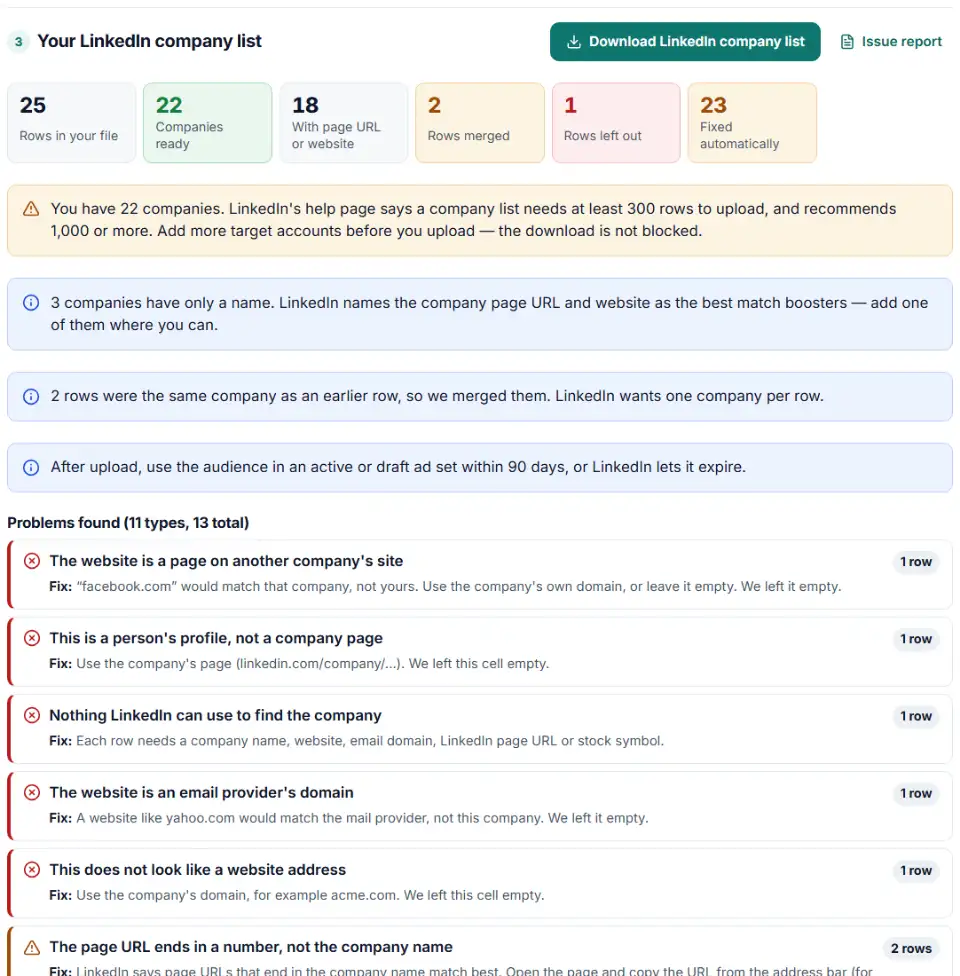
What the formatter cleans
- Websites:
https://www.Acme.com/about?ref=xbecomesacme.com. A Facebook or Yelp page in the website column is removed, becausefacebook.comwould match the wrong company. - Page URLs:
/about/endings and Sales Navigator links are turned intohttps://www.linkedin.com/company/name/. Personal profiles (/in/) are rejected. - Email domains: taken from work emails when you have no domain column; free mail domains are skipped.
- Tickers and countries:
NYSE:CTSObecomesCTSOand “Deutschland” becomesDE. - Duplicates: rows with the same page URL, domain or name are merged, and empty cells are filled from the other rows.
Upload the company list in Campaign Manager
- Go to Plan › Audiences.
- Click Create audience › Matched Audience.
- Choose Company / Contact, then Next.
- Give the audience a name, set List type to Company list and click Select list.
- Click Agree & Upload, then allow up to 48 hours for matching.
Add the audience to an ad set within 90 days so it does not expire. Campaign Manager's Companies Hub can also save static or dynamic company lists without any CSV.
LinkedIn company list errors and how to fix them
Upload rejected after editing headers
LinkedIn says that changing or removing template headers causes an upload error. A common slip is renaming companywebsite to “Website” or deleting the stocksymbol column because it is empty. Keep the header row exactly as downloaded.
Why is my LinkedIn company list under 300 members?
LinkedIn counts matched member accounts, not companies. A list of small firms can match many companies and still stay under 300 members. When the audience name stays gray with “< 300 members”, widen the list or add page URLs so more companies are recognized.
Company page URL vs website for matching
Both are strong. A page URL points to exactly one company, which helps when two firms share a name. LinkedIn asks for page URLs that end in the company name, so a link like /company/10357/ gets a warning: open the page and copy the readable URL instead.
Commas in company names
“Smith, Jones & Partners” splits into two columns if a sheet is saved without quotes. LinkedIn's API guide asks for double quotes around such names. Our file always quotes them.
Stock symbol as the only identifier
The help page accepts a ticker alone, but the API guide does not list it as an identifier. To be safe, add a name or website next to every ticker.
Audience expired
A company list that sits unused for 90 days expires. Keep the downloaded CSV, upload it again as a new audience, and attach it to a draft ad set if the campaign starts later.
Frequently asked questions
What columns are in LinkedIn's company list upload template?
Ten: companyname, companywebsite, companyemaildomain, linkedincompanypageurl, stocksymbol, industry, city, state, companycountry and zipcode. Each row needs at least one of the first five. Keep all ten headers, even when a column is empty.
How many companies should a LinkedIn company list have?
The upload needs at least 300 rows, and LinkedIn recommends 1,000 or more companies, organizations or schools. One file can hold up to 300,000 companies or 20 MB.
Which company fields give the best match rate on LinkedIn?
LinkedIn points to the company page URL and the company website as the strongest fields. Industry, city, state, country and ZIP code help it pick the right company when names are similar.
Why does my LinkedIn company list show fewer than 300 members?
LinkedIn counts matched member accounts, not companies, and an audience needs at least 300 of them before it can run. A short list of small firms may stay below that. Add more accounts, or add page URLs and websites so more of your companies are found.
Why did my LinkedIn company list audience expire?
LinkedIn lets a matched audience expire when it is not used in an active or draft ad set for 90 days. Attach it to a draft ad set right after upload if your campaign starts later, or upload the list again.
Do I need to clean website URLs before uploading a company list?
It helps. LinkedIn’s own template example uses the bare domain, like linkedin.com, not a full link. This tool cuts https://www.acme.com/about down to acme.com for you. It also catches Facebook pages and Gmail addresses typed into the website column.
Related tools and guide
-
Fill LinkedIn's contact list CSV template from a HubSpot, Salesforce or Shopify export, with every rejected row explained.
LinkedIn -
Turn CRM deals into LinkedIn's offline conversions file, with dates, amounts, currency and event types checked and emails hashed if you want.
LinkedIn -
Get a health score for a customer list, fix email typos in one click and send the clean list to the Google, Meta or TikTok formatter.
GoogleMetaTikTok -
Map any CRM or store export to Google's Customer Match columns, fix phones and emails, and download a plain or hashed CSV.
Google -
Turn a customer export into a Microsoft Advertising customer match file, with emails cleaned the way Microsoft asks, hashed and de-duplicated.
Microsoft
Need help setting this up? Talk to EmproIT