Lead Form Webhook Payload Builder for Google Ads
Build a test lead in Google's exact webhook format with a ready curl command, or paste what your endpoint received to check the key, phone format, IDs and duplicates.
Lead Form Webhook Payload Builder for Google Ads
1 Build or check a webhook lead
2 Your payload / check results
Fill in the settings above — your result appears here instantly.
Rules last checked: against the official pages:
- How to set up a webhook integration for a lead form (Google Ads)
- Implementation – Lead Form Webhook (Google Ads)
- Samples – Lead Form Webhook (Google Ads)
- Testing – Lead Form Webhook (Google Ads)
How to test a Google Ads lead form webhook
A Google Ads lead form webhook sends each new lead straight to your CRM or server, so nobody has to download a CSV before the 30-day window closes. This tool builds test leads in the format from Google's webhook implementation guide and checks the leads your endpoint actually receives. It never connects to your endpoint itself.
- Pick the questions your form asks. Tick the contact fields and type the column IDs of any qualifying questions, such as
SERVICE. Real requests only contain the questions on the form, so match it exactly. - Add your IDs and key. Enter your campaign and form IDs if you know them, and the webhook key from the lead form. Choose a test lead or one that looks like a real lead.
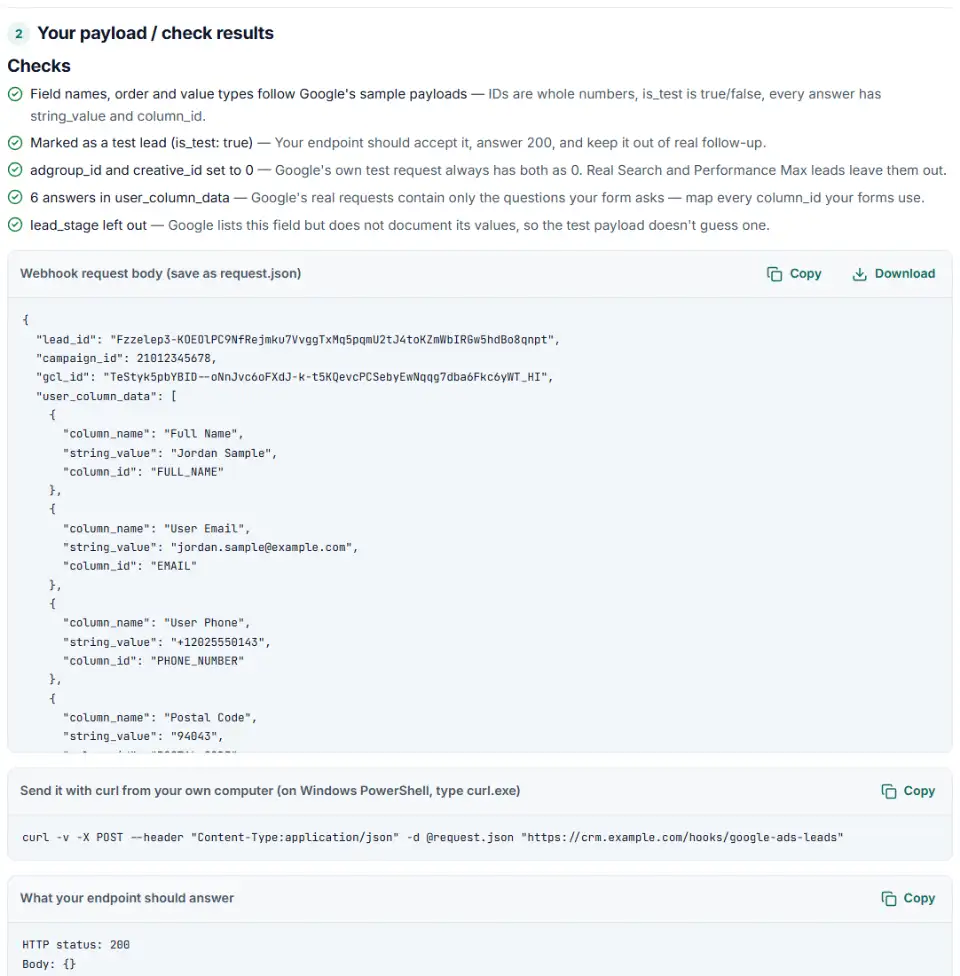
- Copy the payload and the curl command. Save the JSON as
request.jsonand run the command on your own computer. It posts the lead to your URL the same way Google's testing page describes. On Windows PowerShell, typecurl.exeinstead ofcurl. - Paste what arrived. Switch to Check a received payload and paste the body from your server log. Add your key so the tool can compare it.
- Fix what the checks flag. Each finding says what is wrong and what to change, and the leads come out as a CSV with one column per question.
Why test beyond the Send test data button
Google's button sends one fixed lead: campaign ID 123456, key testkey, and either sample answers or dummy_value, depending on which Google page you read. Its phone, 1-650-555-0123, isn't even in the E.164 format real leads use. That proves your URL answers, not that your code maps a postal code, a qualifying question or a 19-digit form ID. A custom payload tests the form you really run.
What to do next in Google Ads
- Open the lead form. Go to Campaigns › Assets, select Lead form above the table, hover over your form and click the pencil icon.
- Find the webhook fields. Expand Export leads from Google Ads, then Other data integration options. Under Webhook integration (optional), paste your URL and key.
- Send test data, then save. A green message means your endpoint replied with status 200. Then confirm the test lead really landed in your CRM with every field mapped.
- Go live with a small budget. Google's go-live recommendations: run the campaign with a small budget, check that real leads arrive correctly in your CRM, then scale up.
- Keep downloading as a backup. If the webhook fails, leads stay available as a CSV download for 30 days and are deleted after 60.
Common lead form webhook errors and fixes
Google Ads lead form webhook not working
Google's setup page names four failure states: the form was saved without a successful test, no data was sent, data was sent but no response came back, or the response was something other than HTTP 200. Check that the URL is complete, reachable from the internet and under 2,048 characters, and that your server replies quickly with 200 and {}.
Webhook key mismatch
If google_key in the request differs from the key on your server, the lead may not come from your form. Reject it. When you change the key in Google Ads, change it on your server the same day, or real leads get dropped.
Phone number not in E.164 format
Google sends User Phone as E.164, for example +11234567890. If your CRM shows (123) 456-7890, something in between reformatted it. Keep the plus sign and country code, because Customer Match and enhanced conversions need them later.
Duplicate leads in your CRM
A lead can arrive more than once, for example after a retry. Store lead_id and ignore repeats.
“dummy_value” leads
These come from the Send test data button. Delete them after testing and keep any lead with is_test: true out of your reports.
IDs that lose their last digits
Form, campaign and asset group IDs are 64-bit numbers. JavaScript and some spreadsheet tools round very long numbers, so a 19-digit ID ends in zeros. Parse IDs as big integers or keep them as text.
Frequently asked questions
What does the Google Ads lead form webhook send?
One HTTP POST per lead with a JSON body. It holds lead_id, campaign_id, form_id, gcl_id, google_key, api_version and a user_column_data list with one entry per answer (column_id plus string_value). Newer leads also carry lead_submit_time and lead_source. Test leads add is_test: true. Only the questions your form asks are included.
What is the webhook key (google_key) for?
It proves the request came from your lead form and not from someone who found your URL. You type the key in Google Ads, Google sends it in every lead, and your server compares the two before saving anything. If your CRM gives you no key, Google says a dummy value like GoogleAds is fine — but still check it.
How do I send a test lead to my webhook?
In the lead form, click Send test data. Google posts one fixed test lead (its testing page shows sample answers and the key testkey; its FAQ says the answers can arrive as dummy_value) and shows a green message if your endpoint replied with status 200. To test with your own questions and values, build a payload above, save it as request.json and run the curl command from your own computer.
What should my webhook return to Google?
HTTP status 200 with the body {}. Google retries a lead when your server answers with a 5XX error, but not after a 4XX error. So send 4XX only for requests you want to drop, such as a wrong key.
How do I avoid duplicate leads from the webhook?
Google does not promise to deliver each lead exactly once. Save lead_id with every lead and skip any request whose lead_id you already have. Paste several deliveries into the checker to see duplicates flagged.
Can I use the gcl_id from a lead for offline conversions?
Yes. gcl_id is the Google click ID of the person who sent the form. Store it with the lead exactly as received. When the lead becomes a customer, upload the sale to Google Ads as an offline conversion with that click ID.
Related tools and guide
-
Build a ready-to-upload Google Ads offline conversions CSV from your CRM export, with time zones, values and 90-day checks done for you.
Google -
Build the enhanced conversions for leads file for Google Ads Data Manager, with emails, phones and hashing done the way Google asks.
Google -
Find broken, changed and expired GCLIDs in your CRM export before Google Ads rejects your offline conversion upload.
Google -
Split click IDs and UTM tags out of thousands of landing page URLs in one go, with no spreadsheet formulas.
GoogleMetaMicrosoftTikTokLinkedIn -
Turn a Google Ads lead form download into a CRM-ready file with clear field names, international phone numbers and no duplicate or test leads.
Google -
Clean a Facebook leads CSV for your CRM: strip “p:” and ID labels, split names, fix dates and merge duplicate leads.
Meta
Need help setting this up? Talk to EmproIT