Auction Insights Visualizer for Google Ads
Upload a Google Ads auction insights export to chart each competitor's impression share, overlap and outranking, track them over time and see who appeared or dropped out.
Auction Insights Visualizer for Google Ads
- Upload
- Chart
- Download
1 Add your auction insights report
Choose a file or drag it here
Excel CSV, TSV, XLSX or Google Sheets download · up to 300 MB
2 Check the columns and options
Rules last checked: against the official pages:
- Use auction insights to compare performance (Google Ads)
- About impression share (Google Ads)
- About top and absolute top metrics (Google Ads)
- metrics fields (auction_insight_*) – Google Ads API v26 (Google Ads)
How to use the auction insights visualizer
This auction insights visualizer turns the table Google Ads gives you into competitor charts, a month-by-month trend and a list of who joined or left your auctions. The six statistics follow Google's Use auction insights to compare performance page. Google's screen shows one date range at a time; segment the download by month or week and this page lines the periods up for you.
- Download the report. In Campaigns, tick your Search or Shopping campaigns, click Auction insights, add a time segment (week or month) and click the download icon. Excel CSV, TSV, XLSX and Google Sheets files all work.
- Drop the file in. The title and date rows on top are skipped. Columns are matched by name, so a report in another layout still works.
- Check the columns. Domain and impression share are needed. The other statistics, the time segment, device and campaign are used when present.
- Read the charts. “What stands out” names the rival that overlaps with you most, the one that sits above you most often and the one you rarely beat.
- Download. Take the competitor summary and the trend table to Sheets or a client report.
How the numbers are handled
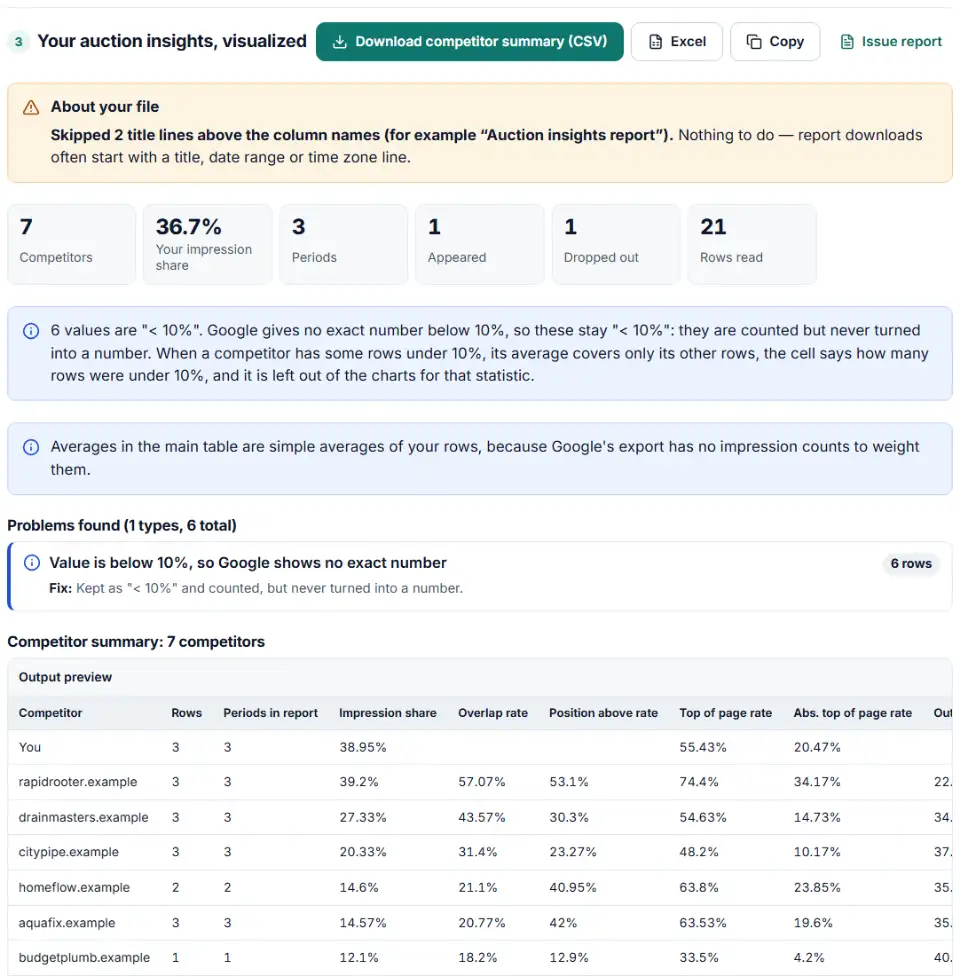
Google shows “< 10%” instead of a number when a value is under 10%. The API writes the same thing as 0.0999. Neither is turned into a made-up figure. A competitor that is under 10% in every row shows “< 10%”. One that is under 10% in only some rows shows the average of its other rows plus a count, such as “45% (1 of 3 rows; 2 < 10%)”, and is left out of the charts for that statistic. Files exported as fractions (0.45) are read as 45%, column by column.
The export has no impression counts, so every average here is a simple average of your rows. When a file is split by time and by device or campaign, a period's value averages its devices or campaigns, and the table title says so. Your own impression share is shown as a range when it covers several rows.
What to do next in Google Ads
- Find out why you lose auctions. Click the columns icon, open Competitive metrics and add Search lost IS (budget) and Search lost IS (rank). Google's impression share data page explains both: one counts auctions missed for lack of budget, the other auctions missed because of a low Ad Rank.
- Check keyword quality. If a rival sits above you more and more often, review the Quality Score parts of your top keywords. A weak landing page or ad text can cost position whatever the bid.
- Compare devices. Segment auction insights by device. A competitor may push hard on mobile only.
- Watch new entrants. A domain that appeared this month with fast-rising impression share is worth a look: search your own keywords and study their ads and offer.
- Make it a habit. Save the report in Google Ads and schedule it, then run each new download through this page.
Common auction insights problems
No auction insights report for my keyword or ad group
Google only builds the report for keywords, ad groups and campaigns that pass a minimum activity threshold. Pick a longer date range, or move up from keyword to ad group or campaign.
Values show “< 10%”
The report gives no exact numbers below 10% for impression share and outranking share. The visualizer keeps these cells as “< 10%”, counts them next to any average, and ranks them below every real number — so a rival you outrank less than 10% of the time is the one named as the rival you outrank least.
Position above and top of page rates are missing
That is normal for Shopping and Performance Max. Google reports only impression share, overlap rate and outranking share there. With a mix of campaign types selected, choose Search campaigns or Shopping campaigns in the drop-down before you download.
google.com appears as a competitor
This can happen when you use Google-hosted domains or a Business Profile, or when a rival's landing page is a Google Site. It does not mean Google is bidding against you.
Numbers differ from the campaign's impression share column
Auction insights leave out very low-impression auctions, and search partners are not included at all. Small differences from the campaign table are expected.
Frequently asked questions
What does overlap rate mean in auction insights?
It is how often another advertiser’s ad got an impression when your ad also got one. An overlap rate of 60% means that in 6 of every 10 auctions where you showed, that competitor showed too. High overlap marks the rivals you meet most often.
What is position above rate?
When your ad and a competitor’s ad showed at the same time, position above rate is how often theirs was shown higher than yours. At 5%, their ad was above yours in 5 of every 100 shared auctions. It exists for Search campaigns only.
What is outranking share?
How often your ad ranked higher than the other advertiser’s ad, or showed when theirs didn’t. Your own row has no outranking share, because it compares you with each competitor. At 20%, you beat that rival 2 out of every 10 times you entered the same auctions.
Where do I find auction insights in Google Ads?
Open Campaigns (or Ad groups or Search keywords), tick the rows you want, and click Auction insights. Use the segment button to split by time, then the download icon. Only items with enough activity have a report.
Which auction insights metrics are available for Shopping and Performance Max?
Impression share, overlap rate and outranking share. Position above rate, top of page rate and absolute top of the page rate are Search-only. Performance Max auction insights are available at campaign and account level, with data from November 2021.
Why is a competitor's impression share different from their own report?
In your report, their impression share is measured over the auctions you were also eligible for. Their own report counts all of their auctions. The two sets only partly overlap, so the numbers rarely match.
Related tools
-
Find the Quality Score part to fix first — expected CTR, ad relevance or landing page — ranked by keyword spend.
Google -
Break search terms into 1–3-word phrases with cost and conversions, and copy the negatives that wasted money.
Google -
Compare cost per result by placement, age, gender or device from an Ads Manager export, without falling for the breakdown effect.
Meta -
Upload your keywords and negatives to see which negatives stop your own keywords from showing, with a removal file for Editor.
Google -
Turn a sheet of headlines and descriptions into responsive search ads for Google Ads Editor, with character limits, paths and pins checked.
Google -
Build an Editor-ready CSV of campaigns, ad groups and keywords from any sheet, with match types, bids and duplicate checks.
Google
Need help setting this up? Talk to EmproIT