Export WooCommerce Customers to Ad Audiences
Export customers from WooCommerce without a plugin, drop the Customers report CSV in, and get Google Ads, Meta and TikTok audience files — phones fixed with the billing country, staff and duplicates removed.
WooCommerce Customer Export to Ad Audiences
- Upload
- Check
- Download
1 Add your WooCommerce customers CSV
Choose a file or drag it here
Customers report CSV, or an export plugin's CSV with billing_email / billing_phone · up to 300 MB
2 Check the columns and options
Rules last checked: against the official pages:
- Customers Report (WooCommerce documentation) (WooCommerce)
- Create a Customer Match list by uploading a data file (old URL answer/7659867 redirects here) (Google Ads)
- Customer list formatting guidelines for custom audiences (Meta (Facebook and Instagram))
- How to create a Custom Audience with a customer file (Last updated: September 2025) (TikTok Ads)
How to export WooCommerce customers for ads without a plugin
To export WooCommerce customers you don't need an extension: the built-in Customers report has a Download button. The WooCommerce Customers report documentation explains what it contains. This tool reshapes that CSV into a Google Ads, a Meta and a TikTok file in one go.
- Open the report. In WordPress admin go to WooCommerce › Customers. Use Advanced filters if you only want some people, for example a Number of orders above zero or a recent Last active date.
- Select Download. A small view saves at once. A big one is prepared in the background and arrives as an emailed link. The phone columns are in the CSV even when they are hidden in the table.
- Drop the CSV here. Name, Email, Billing phone, Shipping phone, Country / Region and Postal code are matched for you. CSVs from order export plugins (
billing_email,billing_phone…) work too. - Set the filters. By default, accounts with no orders and staff accounts are left out. If an opt-in plugin added a consent column, match it and only people who said yes stay in.
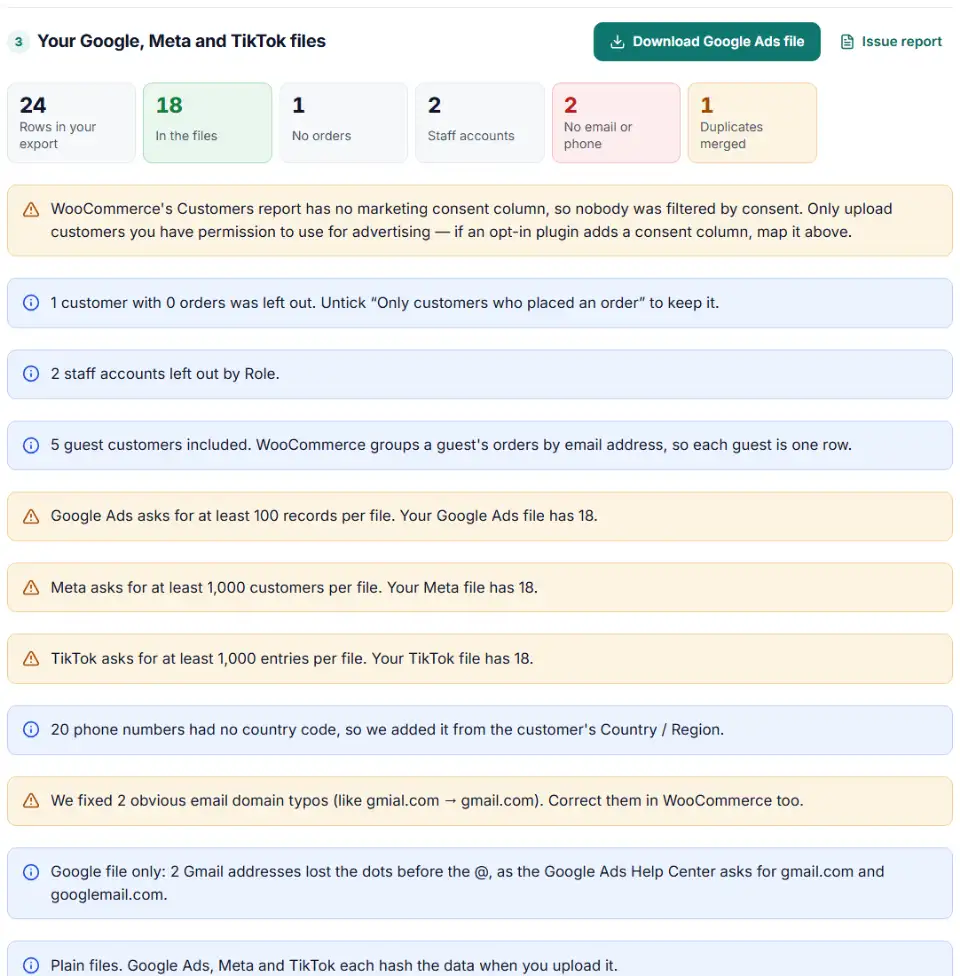
- Download the three files. Every customer left out is listed in a separate file, with the reason.
What happens to the WooCommerce columns
- Name — split into first and last name, without titles like “Dr.” or emoji.
- Billing phone and Shipping phone — both are read, rebuilt in E.164 with the row's Country / Region, and kept once if they are the same number.
- Country / Region and Postal code — Google uses them with the name for address matching; Meta gets them as separate columns.
- Orders, Role and Total spend — only used for the filters and the optional Meta value column. They never go into the Google or TikTok file.
WooCommerce documents the report columns but not the exact CSV header row, so the tool reads the header row of your own file. If a column is not recognized, pick it under Columns matched.
What to do with the three files
- Google Ads file. Open Audience manager from Tools › Shared library, add a Customer list under Your data segments and upload the file. Google needs at least 100 records, and the list can take up to 48 hours to fill.
- Meta file. Create a Customer list custom audience in Ads Manager and upload it. If you added the value column, answer yes when Meta asks whether customer value is included.
- TikTok file. In TikTok Ads Manager use Tools › Audience Manager › Create Audience and pick Customer File. The audience can only be used once 1,000 people are matched.
- Use the lists twice. Target them for repeat sales, and add them as exclusions in prospecting campaigns so you stop paying to reach people who already bought.
Common WooCommerce customer export problems
WooCommerce customers report emailed instead of downloaded
Larger reports are built in the background. WooCommerce emails you a download link when the file is ready. Use that file as it is — opening and saving it in Excel first can damage phone numbers and ZIP codes.
WooCommerce billing phone without country code
WooCommerce documents no format for phone numbers, so they come out the way customers typed them, such as 0412 555 018 or 312.555.0123. Ad platforms need the country code, so every number is read with that customer's own Country / Region. The default country above is only used when a row has none.
Store staff and test accounts in the list
Test orders by your own team put staff accounts in the report. Accounts whose Role mentions administrator or shop manager are left out; check the left-out file if you use other staff roles.
The same person on two rows
Exports from plugins or merged stores can list a customer twice. Rows with the same email (or the same phone, when there is no email) become one customer in every file.
No consent information
The Customers report has no marketing consent column. Before you upload, make sure your privacy policy and the law where your customers live allow you to use their details for advertising.
Frequently asked questions
How do I export customers from WooCommerce without a plugin?
In WordPress admin open WooCommerce › Customers, set any filters you want, and select Download. WooCommerce saves the current customer view as a CSV file. No extension is needed.
What columns are in the WooCommerce Customers report CSV?
The report shows Name, Last active, Date registered, Email, Orders, Total spend, AOV, Country / Region and Role, with Username, City, Region, Postal code, Billing phone and Shipping phone available from the column menu. WooCommerce’s Customers report guide says the CSV always includes Billing phone, Shipping phone and Role (as the last column). It does not print the full header row, so this tool reads yours.
Why was my WooCommerce customer export sent by email?
For larger reports WooCommerce prepares the file in the background and emails you a download link when it is ready. Small views download straight away.
How do I turn a WooCommerce export into a Facebook custom audience?
Drop the CSV in above and download the Meta file. In Meta Ads Manager go to Audiences › Create audience › Custom audience › Customer list and upload it. Meta’s guidelines ask for at least 1,000 customers per list.
How are phone numbers fixed using the billing country?
WooCommerce doesn’t document a phone format, so numbers usually look the way customers typed them. Each number is read with the same row’s Country / Region, so (503) 555-0132 for a US customer becomes +15035550132 and 0113 496 0123 for a UK customer becomes +441134960123.
Does this tool need access to my WordPress site?
No. There is no plugin, no API key and no login. You download the report yourself and your browser does the work. The customer data never reaches our server.
Related tools and guide
-
One Shopify customers CSV in, Google, Meta and TikTok audience files out, filtered by marketing consent and tags.
GoogleMetaTikTokShopify -
Add up each customer's orders into Meta's customer value column, drop refunds and mixed currencies, and download the lookalike source list.
Meta -
Map any CRM or store export to Google's Customer Match columns, fix phones and emails, and download a plain or hashed CSV.
Google -
Turn a CRM or store export into a Facebook custom audience CSV with Meta's column names, country codes and optional hashing.
Meta -
Build a TikTok custom audience file from a messy export, with TikTok's template columns, phones with country codes and the 1,000-entry check.
TikTok -
Get the Mailchimp import CSV format right: one Tags column, groups split by comma and space, MM/DD birthdays, one file per status.
Mailchimp
Need help setting this up? Talk to EmproIT