Turn Your Shopify Customer Export into Google, Meta and TikTok Audiences
Drop in your Shopify customers export and get three upload-ready files — Google Ads Customer Match, Meta customer list and TikTok customer file — with consent, tags and phone numbers handled.
Customer Export Converter for Shopify
- Upload
- Check
- Download
1 Add your Shopify customers export
Choose a file or drag it here
The customers CSV from Shopify admin (plain or “for Excel”) · up to 300 MB
2 Check the columns and options
Rules last checked: against the official pages:
- Importing and exporting customer lists (Shopify)
- Create a Customer Match list by uploading a data file (old URL answer/7659867 redirects here) (Google Ads)
- Customer list formatting guidelines for custom audiences (Meta (Facebook and Instagram))
- How to create a Custom Audience with a customer file (Last updated: September 2025) (TikTok Ads)
How to turn a Shopify customer export into ad audiences
A Shopify customer export already holds what ad platforms match on: email, phone, name and address. It just doesn't hold it in their format. Shopify's import and export guide lists the columns, and this tool knows every one of them, so the same CSV becomes three upload files at once.
- Export from Shopify admin. Go to Customers › Export, choose All customers (or a filtered segment), tick Customer tags and export. Lists over 50 customers arrive by email.
- Drop the CSV here. Shopify's column names are matched for you, including both phone columns. Nothing leaves your browser.
- Decide who goes in. By default an email address is only used when Accepts Email Marketing is
yes, and a phone number only when Accepts SMS Marketing isyes. Switch to email-only or everyone if your consent rules allow. - Filter by tag if you need to. Keep only VIPs for a high-value audience, or leave out staff, wholesale or test accounts.
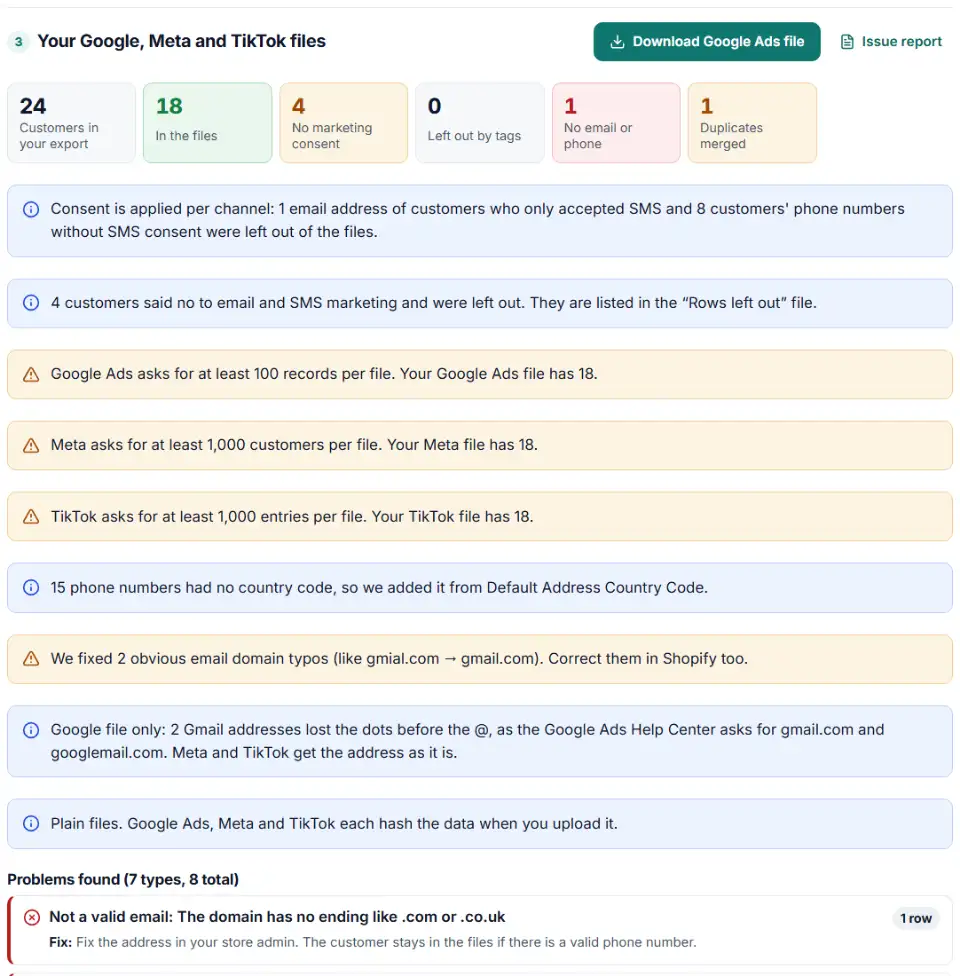
- Download three files. One button each for Google Ads, Meta and TikTok, plus a file of the customers that were left out and why.
Where each Shopify column ends up
| Shopify column | Google Ads | Meta | TikTok |
|---|---|---|---|
| Email (Gmail dots removed) | |||
| Phone, Default Address Phone | Phone, E.164 | phone, E.164 | phone, E.164 |
| First Name, Last Name | Only with Country + Zip | fn, ln | — |
| Default Address City / Province Code | — | ct, st | — |
| Default Address Country Code, Zip | Country, Zip | country, zip | — |
| Total Spent | — | value (optional) | — |
Shopify's help page gives no rule for how phone numbers are typed — its template shows +1 (613) 555-5555. Customers type all sorts, so every number is rebuilt in E.164 using the customer's Default Address Country Code.
Upload each file
- Google Ads. Tools › Shared library › Audience manager › Your data segments, click the plus button and choose Customer list. Upload the Google file, accept the Customer Match policy and set a membership duration (540 days at most). Processing can take up to 48 hours.
- Meta. In Ads Manager open Audiences › Create audience › Custom audience › Customer list, add the Meta file, check the mapped identifiers and select Import and create. If you added the value column, answer yes to the customer value question.
- TikTok. In TikTok Ads Manager go to Tools › Audience Manager › Create Audience › Custom Audience › Customer File, upload the TikTok file, name it and click Confirm. TikTok takes 24 to 48 hours.
- Refresh every month. Export again and replace the lists. Meta marks a customer list as outdated when it has not been updated for 30 days.
Common Shopify customer export problems
Shopify customer export sent by email
That is normal for more than 50 customers. Drop the emailed file in here unchanged.
The Accepts Email Marketing column says no for most customers
The column only says yes for customers who agreed to email marketing, such as a newsletter. Shopify's help page defines just two values, yes and no. Anything else, or an empty cell, is treated as no, and the tool tells you how many cells that affected.
The Tags column is missing
Tags are an optional part of the export. Run the export again with Customer tags ticked, otherwise the tag filters have nothing to read.
Phone numbers like 1.41655E+10
This happens when the CSV was opened by double-clicking it in Excel and saved again. Excel rounds long numbers and the last digits are gone for good. Export again from Shopify and drop the fresh file in without opening it first.
Lists far smaller than the export
Each platform only counts people it could match, and the consent filter removes people too. If most customers were left out for consent, your opt-in rate is just low.
Frequently asked questions
How do I export customers from Shopify?
In Shopify admin open Customers and click Export. Choose the current page, all customers, the selected customers or the customers that match your filter, tick Customer tags if you want the Tags column, pick a CSV format and click Export customers.
Why was my Shopify customer export emailed instead of downloaded?
Shopify downloads an export straight away only when it has 50 customers or fewer. Bigger exports are sent by email. If you are not the store owner, the owner gets a copy too, so check both inboxes.
Which Shopify columns are used for Google, Meta and TikTok audiences?
Email, Phone and Default Address Phone go into all three files. First Name, Last Name, Default Address Country Code and Default Address Zip are used by Google (as a set) and by Meta. Meta also gets the city and province code. TikTok’s customer file only takes email and phone.
Should I only upload customers who accept marketing?
It is the cautious default, and this tool applies it per channel: an email goes in only when Accepts Email Marketing is yes, and phone numbers only when Accepts SMS Marketing is yes. TikTok’s help says only opted-in people can be reached with a customer file audience. Under privacy laws such as GDPR you need a lawful basis for every person you upload — ask your legal adviser before you include customers who said no.
Can I export customers with tags from Shopify?
Yes. Tick Customer tags in the export window and the file gets a Tags column with the tags separated by commas. Use the tag boxes above to keep only one group (like VIP) or to leave staff and test accounts out.
Does this tool connect to my Shopify store?
No. There is no app to install and no login. You export the CSV yourself, and the file is read by your own browser. Nothing is uploaded to us, to Shopify or to any ad platform.
Related tools and guide
-
Turn WooCommerce's built-in Customers report CSV into Google, Meta and TikTok audience files — no plugin, nothing uploaded.
WooCommerceGoogleMetaTikTok -
Map any CRM or store export to Google's Customer Match columns, fix phones and emails, and download a plain or hashed CSV.
Google -
Turn a CRM or store export into a Facebook custom audience CSV with Meta's column names, country codes and optional hashing.
Meta -
Build a TikTok custom audience file from a messy export, with TikTok's template columns, phones with country codes and the 1,000-entry check.
TikTok -
Turn a Shopify orders export into Google Ads and Meta offline conversion files for in-store and draft orders, without counting online sales twice.
GoogleMeta -
Get the Mailchimp import CSV format right: one Tags column, groups split by comma and space, MM/DD birthdays, one file per status.
Mailchimp
Need help setting this up? Talk to EmproIT