Cost Data Import CSV Builder for GA4
Turn a Microsoft Advertising, LinkedIn, X, Amazon or other ad report into a GA4 campaign data (cost data) import file: one row per campaign per day, exact utm_source and utm_medium, YYYY-MM-DD dates and a currency column.
Cost Data Import CSV Builder for GA4
- Upload
- Check
- Download
1 Add your ad platform report
Choose a file or drag it here
CSV, Excel, TSV or TXT with one row per campaign per day · up to 300 MB
2 Check the columns and options
Rules last checked: against the official pages:
- Import campaign data (Analytics Help) (Google Analytics 4)
- About Data Import (limits, upload steps) (Google Analytics 4)
- Gather campaign data from your advertising platforms to import into Google Analytics (Google Analytics 4)
How to build a GA4 cost data import file
A GA4 cost data import puts spend from other ad platforms next to the sessions and conversions GA4 already tracks, so you can compare cost per conversion across channels. Google now calls it campaign data import, and its Import campaign data page sets the format. GA4 now connects Meta, Pinterest, Reddit, Snap and TikTok directly, so this tool is built for the platforms it doesn't connect: Microsoft Advertising, LinkedIn, X, Amazon, Quora and others.
- Export a daily campaign report. In your ad platform, export date, campaign name, campaign ID, spend, clicks and impressions with a daily breakdown. Google suggests 12 months of history for a first import.
- Load the report. Drop in the CSV or Excel file, or paste it. Report title lines above the column names and total or copyright lines below the data are skipped.
- Type your utm_source and utm_medium. Most reports have no source or medium column, so enter exactly what your ad links use, such as
bingandcpc. - Pick the currency and column names. Choose the currency of the spend and either Google's help-page names or the downloadable template names.
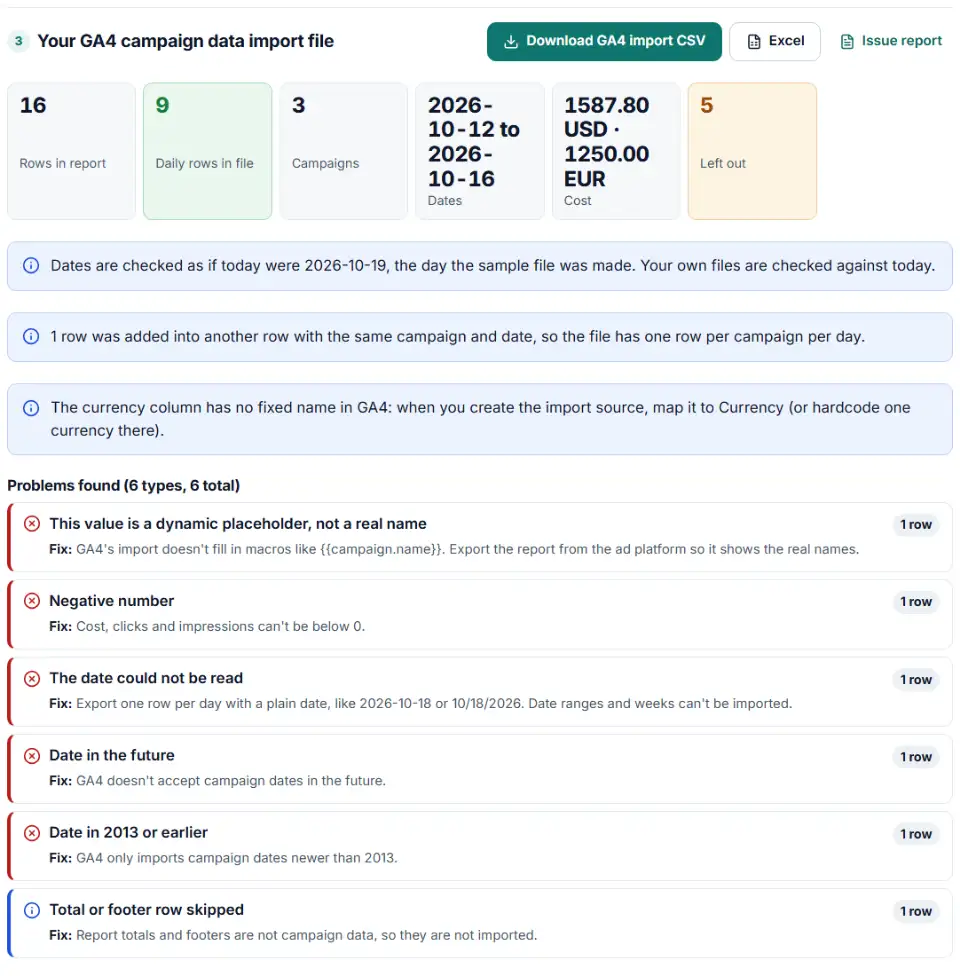
- Download the CSV. You get one row per campaign per day with dates as YYYY-MM-DD, cost with two decimals and a currency column, plus a list of rows left out.
What the builder checks
- Dates newer than 2013 and not in the future; date ranges and week labels are refused.
- Keyword and ad rows are added up, because utm_term and utm_content can't be imported.
- Macros like
{{campaign.name}}are flagged, as the import doesn't fill them in. - Spellings of the same source that differ only in capitals, which GA4 treats as different sources.
- Rows from platforms GA4 connects directly, so you don't count their cost twice.
Import campaign data into GA4
- Create the import source. In GA4 go to Admin › Data collection and modification › Data import and click Create import source. Name it, choose the data type Campaign data and the source Manual CSV upload. You need the Editor role or higher.
- Upload and map. Choose the CSV, click Next and map each column to its Analytics field. Map the currency column to Currency, or set one fixed currency. Then click Import.
- Add new days later. Open the source in Data import and click Import now with a new file that has the same columns or fewer. Newer values for the same campaign and date replace the old ones.
- Check the result after 24 hours. Look at Reports › Acquisition › Non Google campaign and the campaign data import validation report, which shows the match rate.
GA4 allows 1 GB of campaign data across all import sources and up to 120 uploads per property per day.
Why GA4 cost data import isn't showing
Low match rate
Imported rows only join with your traffic when utm_source, utm_medium, utm_campaign and date are exactly the same, including capitals. "Spring_Sale" and "SpringSale" don't match. Fix the links or the values in the file, then upload again.
Links without UTM tags
If the ads don't carry utm_source and utm_medium, GA4 can't link sessions to the imported cost. Tag every ad with utm_id, utm_source, utm_medium and utm_campaign, and keep one source and medium per platform.
Cost counted twice
Connecting Meta, Pinterest, Reddit, Snap or TikTok directly and also uploading a CSV for the same platform doubles its cost. Delete the overlapping CSV data before you switch to the direct connection.
Currency missing
Since July 2026, GA4 requires a currency whenever you import cost. Older import sources keep reporting cost in the property currency.
Weekly or monthly totals
The import is daily. A row for a week or a month can't be read; export the report again with a daily breakdown.
Not in audiences or explorations segments
Campaign data joins at report time. It shows in reports, but it can't be used for audiences or segments, and deleting the import source removes it from reports.
Frequently asked questions
What columns does a GA4 cost data import file need?
Required: utm_source, utm_medium and date, plus at least one metric: cost, clicks or impressions. Campaign ID (utm_id) and campaign name (utm_campaign) are optional but highly recommended. If you import cost, GA4 also needs a currency: a column you map, or one fixed currency set during setup.
Which ad platforms can GA4 import cost data from directly?
Meta, Pinterest, Reddit, Snap and TikTok can be connected as third-party sources that pull up to 24 months of history and update daily. For Microsoft Advertising, LinkedIn, X, Amazon and other platforms you still upload a CSV, which is what this tool builds.
Can I include utm_term or utm_content in GA4 cost data?
No. GA4’s campaign data import doesn’t accept term or content. Export your report at campaign level, or let this tool add keyword and ad rows up into one row per campaign per day.
What date format does GA4 cost data import use?
ISO 8601: YYYY-MM-DD, for example 2026-10-18, one row per day. Dates must be newer than 2013 and not in the future. This tool converts US, European and Excel dates for you.
Why doesn't my imported cost show next to my campaigns in GA4?
GA4 joins imported rows to your traffic on utm_source, utm_medium, utm_campaign and date, and the match is exact and case sensitive: “LinkedIn” and “linkedin” are different. Use the same spelling as your ad links, and allow up to 24 hours after the upload.
Is cost data import now called campaign data import?
Yes. Google renamed Cost data import to Campaign data import. It’s the same feature: in GA4 choose the data type Campaign data when you create the import source.
Is my ad spend data uploaded to your site?
No. The report is read and converted in your browser. Nothing is sent to our server.
Related tools and guide
-
Paste or upload your campaign links and find broken, inconsistent or Unassigned UTM tags — with a corrected link for every row.
GoogleMetaTikTokMicrosoft -
Build a UTM naming convention your team can follow: GA4-safe sources and mediums, a campaign pattern, a printable guide and a built-in link checker.
GoogleMetaTikTokMicrosoft -
Build a Microsoft Advertising tracking template or final URL suffix, catch Google-only tags that break after an import and see the GA4 channel.
Microsoft -
Build LinkedIn tracking links with the new campaign, ad set and ad name macros, convert strings from before the 2025 rename and see the GA4 channel.
LinkedIn -
Paste a link or a GA4 report and see the default channel for every row — with the rule that matched and a fix for Unassigned traffic.
Google -
Send phone, in-store or CRM sales to GA4 from a spreadsheet, with order IDs, items, values and time limits checked, plus a script that tests first.
Google
Need help setting this up? Talk to EmproIT