Measurement Protocol Payload Builder for GA4 Purchase Events
Turn a spreadsheet of phone, in-store or CRM orders into GA4 Measurement Protocol purchase requests: grouped by client_id, 25 events per request, items, value and the 72-hour limit checked.
Measurement Protocol Payload Builder for GA4
- Upload
- Check
- Download
1 Add your orders
Choose a file or drag it here
CSV, Excel, TSV or TXT: one row per order or per line item · up to 300 MB
2 Check the columns and options
Rules last checked: against the official pages:
- Measurement Protocol reference (gtag.js and Firebase tabs; page last updated 2026-10-13) (Google Analytics 4)
- Send Measurement Protocol events to Google Analytics (page last updated 2026-10-13) (Google Analytics 4)
- Validate events (page last updated 2026-10-13) (Google Analytics 4)
- Recommended events reference - Online sales (page last updated 2026-09-16) (Google Analytics 4)
How to send GA4 Measurement Protocol purchase events in bulk
A GA4 Measurement Protocol purchase event tells Google Analytics about a sale your website tag never saw: a phone order, an in-store payment or a deal closed in your CRM. Google's Measurement Protocol reference sets strict limits, and the endpoint doesn't return an error when a body is wrong. For one test event, Google's own Event Builder is fine. This tool is for many orders at once.
- Export your orders. One row per order, or one row per line item like a Shopify or WooCommerce export. You need the GA client ID saved with each order, the order ID, date, items and prices.
- Load the file. Rows with the same order ID become one purchase with several items.
- Check the columns and options. Add your Measurement ID and pick the time zone and currency. Choose refund to send refunds instead.
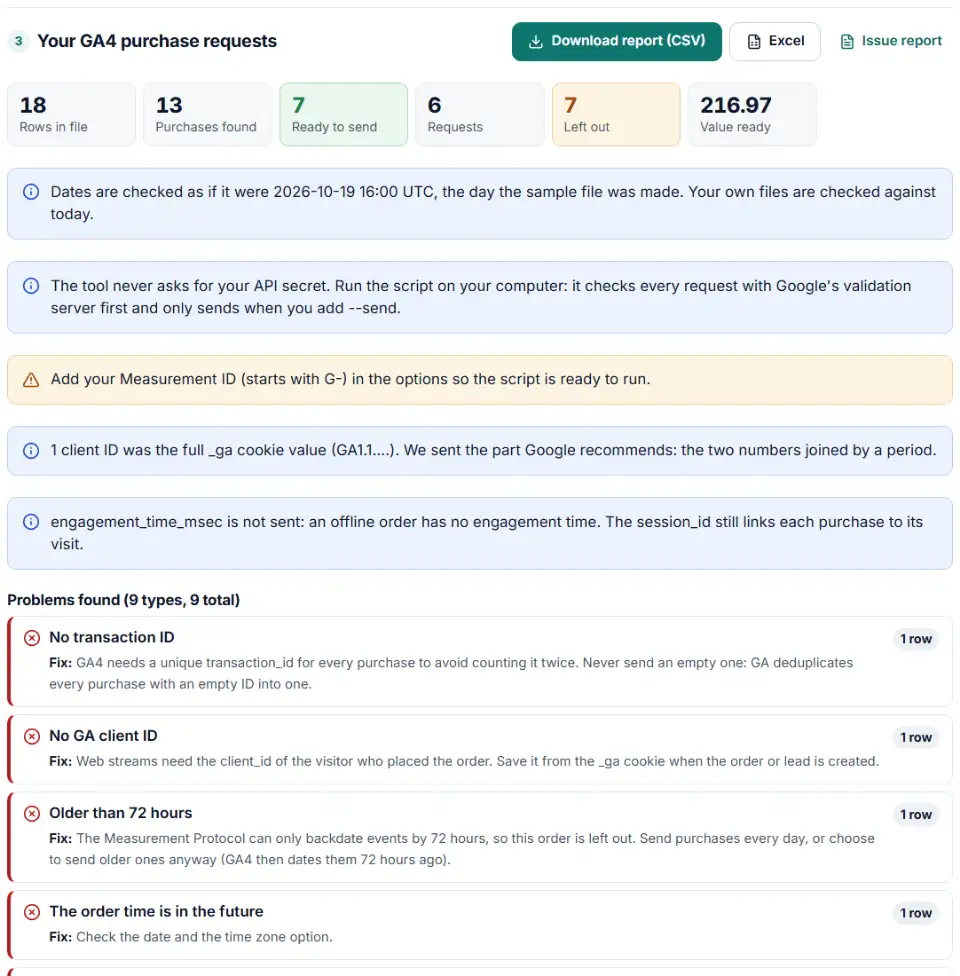
- Read the checks. Orders without a client ID or items, older than 72 hours, in the future or with bad numbers are left out with a reason.
- Download the requests and the script. The requests file holds one JSON body per line, grouped by client and capped at 25 events. The script checks them on Google's validation server, then sends them when you say so.
Checks that go beyond a single-event builder
- Value: worked out as price × quantity without shipping or tax when you have no value column, and checked against it with a warning when you do.
- Transaction ID: required and never empty, because GA4 merges every purchase with an empty ID into one.
- Time: written as
timestamp_micros(microseconds), within the 72-hour window. - Size: 25 events per request, up to 200 items per purchase and request bodies under 130 kB.
Validate and send the requests
- Create an API secret. In GA4, open Admin › Data collection and modification › Data streams, choose the web stream, open Measurement Protocol API secrets and click Create.
- Check first. Save both files in one folder and run
GA4_API_SECRET=your_secret node send-ga4-purchases.mjs ga4-mp-requests.ndjson. On Windows PowerShell, first run$env:GA4_API_SECRET="your_secret", then the node command. Every request goes to the validation server; fix anything it reports. - Send. Run the same command with
--sendat the end. Each request should return HTTP 2xx. If one doesn't, fix the request instead of sending it again. - Look in GA4. Purchases appear in the monetization reports once GA4 has processed them. GA4's create and modify event rules don't apply to Measurement Protocol events, so send the final event names.
Google also added a Data Manager API in 2026 that can send events to GA4 from a server. The Measurement Protocol remains the simplest option for a daily file.
Measurement Protocol problems and fixes
Events not showing in reports
The collect endpoint answers with success even for a broken body. Run the requests through the validation server first, and remember that events sent to the validation server never appear in reports.
NAME_INVALID or NAME_RESERVED
Event names must start with a letter, use only letters, numbers and underscores, and be 40 characters or fewer. Names like session_start are reserved.
VALUE_REQUIRED for client_id
Web streams need a client_id. Use the value saved from the visitor's GA cookie, not an order number or email. App streams use app_instance_id instead, which this tool doesn't build.
Purchases counted twice
Send each order once with the same transaction_id your website tag used, so GA4 can drop duplicates. Deduplication by transaction ID works for web streams only.
Revenue on the wrong day
An order older than 72 hours is dated 72 hours ago. Send purchases every day, and check the time zone option so recent orders don't look older than they are.
Purchases without a traffic source
Google warns that events sent only through the Measurement Protocol may give partial reports. Capture the session_id of the visit with the order and send it with the event, so GA4 can connect the sale to that session.
Frequently asked questions
What does a GA4 Measurement Protocol purchase event need?
A request with the visitor’s client_id and an event named purchase whose params hold a unique transaction_id, the value, the currency and an items array, where each item has item_id or item_name. Google’s rule for value: the sum of price × quantity, without shipping or tax. Add timestamp_micros for the order time and session_id to tie it to the visit.
Where do I find the API secret and Measurement ID?
In GA4 go to Admin › Data collection and modification › Data streams and pick your web stream. The Measurement ID (G-…) is at the top. Under Measurement Protocol API secrets, click Create, give it a nickname and copy the secret value. Keep the secret private and never put it in website code.
How many events can I send in one Measurement Protocol request?
Up to 25 events, each with up to 25 parameters, and the JSON body must be smaller than 130 kB. One request carries one client_id, so this tool groups purchases by client and splits them into requests of 25.
How far back can I date a Measurement Protocol event?
72 hours. In the default relaxed mode, an older event is accepted but dated 72 hours ago, so its revenue lands on the wrong day; with ENFORCE_RECOMMENDATIONS it is rejected. That’s why the Measurement Protocol suits daily uploads, not backfilling last month’s orders.
How do I check a Measurement Protocol request before sending it?
Send the same body to the validation server at /debug/mp/collect with validation_behavior set to ENFORCE_RECOMMENDATIONS. An empty validationMessages list means it’s valid. The validation server doesn’t check your API secret or Measurement ID, and its events don’t appear in reports. The script from this tool does the check first.
Why don't my Measurement Protocol events show session or source data?
Events sent only through the Measurement Protocol carry no visit of their own. Send the session_id of the visit that led to the order, and send the event within 24 hours of the session start to use that session’s location and device. Events meant to join with website events should reach GA4 within 48 hours.
Do you see my orders or my API secret?
No. The file is checked in your browser and nothing is uploaded. The tool never asks for your API secret: the script reads it from your own computer when you run it.
Related tools and guide
-
Paste your event list, tracking plan or gtag code and catch names GA4 rejects, reserved words and duplicates that differ only by case.
Google -
Build GA4 ecommerce code for carts and purchases, and check code you already have for old event names, text prices and totals that don't add up.
Google -
Turn a Shopify orders export into Google Ads and Meta offline conversion files for in-store and draft orders, without counting online sales twice.
GoogleMeta -
Get Microsoft, LinkedIn, X or Amazon ad spend into GA4: build the campaign cost import file, with date checks and a warning for double imports.
GoogleMicrosoftLinkedInXAmazon -
Paste a link or a GA4 report and see the default channel for every row — with the rule that matched and a fix for Unassigned traffic.
Google -
Get one script that saves ad click IDs and UTM tags when visitors land and fills your form's hidden fields, ready for offline conversion uploads.
GoogleMetaMicrosoftTikTokLinkedIn
Need help setting this up? Talk to EmproIT