Event Naming Convention & Parameter Validator for GA4
Check a whole list of event names, parameters and user properties against GA4's naming rules: 40-character limit, reserved names and prefixes, case clashes and parameter limits, with a fixed name for every problem.
Event Naming Convention & Parameter Validator for GA4
1 Paste your events
2 Check results
Fill in the settings above — your result appears here instantly.
Rules last checked: against the official pages:
- Event naming rules (Analytics Help) (Google Analytics 4)
- Event collection limits (Analytics Help) (Google Analytics 4)
- [GA4] About custom dimensions and metrics - Limits (Google Analytics 4)
- [GA4] Recommended events (Google Analytics 4)
How to check your GA4 event naming convention
A GA4 event naming convention only works if every name also passes Google's own rules. This checker reads your whole list at once and tests each name against Google's event naming rules and collection limits. Then it suggests a clean name for each one that breaks a rule.
- Paste your events. Use a plain list, or copy rows from your tracking plan spreadsheet: event, parameter and an example value. Developers can switch to Code or JSON and paste
gtag('event', …)calls,dataLayer.push()code or a Measurement Protocol body. - Add user properties if you use them. They have tighter limits: 24 characters for the name and 36 for the value.
- Pick your property and stream. Analytics 360 raises the parameter limits. Web and app streams reserve different names, so choose the one you send to.
- Read the summary. Errors are names GA4 won't process. Warnings are names that work but cause messy reports, such as
Add_to_cartnext toadd_to_cart. - Copy the fixes. The rename list maps each old name to a suggested one. Download it, or the full results, as CSV for your developer or agency.
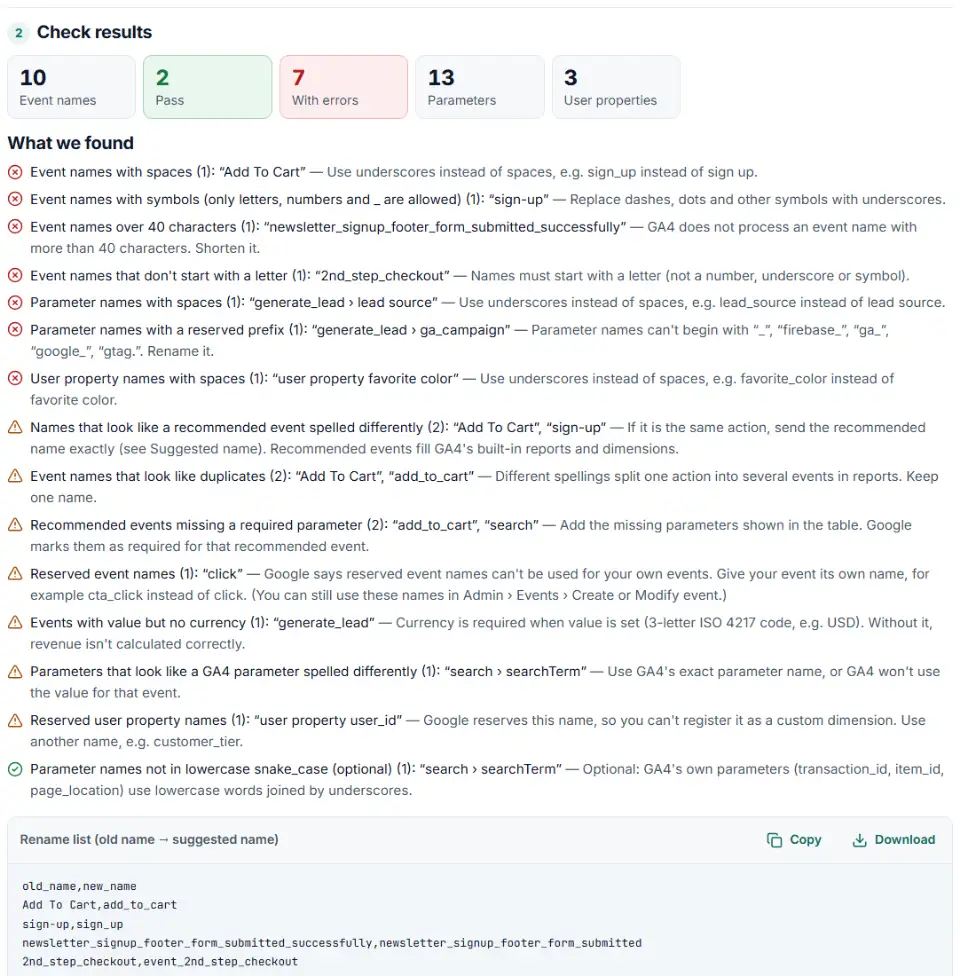
What the checker tests
- Shape — starts with a letter, only letters, numbers and underscores, no spaces, at most 40 characters.
- Reserved words — Google's reserved event names for web and app, the
query_idprefix, and the parameter prefixes_,firebase_,ga_,google_andgtag.. - Duplicates — names that differ only in case, dashes or underscores, which GA4 counts as separate events.
- Recommended events — home-made names like
addToCartorsignupthat should be Google's recommended event names, and recommended events that miss a required parameter. - Limits — 25 parameters per event, 100-character values, 25 user properties per property (higher on 360).
What to do next in GA4 and Tag Manager
- Fix the name where it is set. In Google Tag Manager that is the Event Name field of each GA4 Event tag. In code it is the second argument of
gtag('event', …). Change it there, not in a report. - Or rename it inside GA4. In Admin, under Data display, click Events, then Modify event › Create. Match
event_nameto the old name and set it to the new one. Google's modify events page says this does not change historical data. - Register the parameters you report on. In Admin › Data display › Custom definitions, open the Custom dimensions tab and click Create custom dimensions. Choose Event scope and type the parameter name exactly as your tag sends it. A standard property has 50 event-scoped slots, so pick only the ones you use.
- Test before you publish. Open GTM Preview or GA4 DebugView and check that each event arrives with the new name and its parameters.
Common GA4 event naming errors and fixes
GA4 custom event not showing up
The most common cause is a name GA4 refuses to process: over 40 characters, a space, a dash, or a first character that is a number. Nothing warns you — the event is simply missing. Shorten or rename it and test again in DebugView.
Two events for one action
Because names are case sensitive, Sign_Up from one tag and sign_up from another become two events. Pick one spelling and fix every tag that sends the others.
Using a reserved event name
Naming your button tracking click or your form tracking form_submit mixes your data with GA4's own enhanced measurement events. Use a name of your own, such as cta_click or quote_form_submit.
Parameter value cut off or missing
Long values like full page titles, search queries or product lists can pass the 100-character limit. Send shorter values, or split the information into two parameters.
Custom dimension can't be created
GA4 refuses some parameter names when you register a custom dimension — reserved ones such as user_id, session_id or gclid, and names with symbols or non-English letters. Rename the parameter in your tag first.
Frequently asked questions
What are GA4's event naming rules?
Google’s rules are short: an event name must start with a letter, may use only letters, numbers and underscores, may not contain spaces, and must not use a reserved name or prefix. Names are case sensitive. See Google’s event naming rules.
How long can a GA4 event name be?
40 characters. Google’s collection limits page says Analytics doesn’t process an event name with more than 40 characters. Parameter names have the same 40-character limit; user property names have 24.
Are GA4 event names case sensitive?
Yes. my_event and My_Event are two different events in GA4. That is why the checker flags names that differ only in letter case — they split one action into two rows in your reports.
Which event names and prefixes are reserved in GA4?
On web streams, names GA4 collects itself are reserved — for example click, scroll, file_download, form_start, session_start and first_visit — plus the prefix query_id. Parameter names can’t begin with _, firebase_, ga_, google_ or gtag.. One documented exception: Google’s Measure pageviews page shows how to send page_view yourself for single-page apps — with send_page_view: false, or you may get duplicate pageviews.
How many parameters can one GA4 event have?
25 on a standard property and 100 on Analytics 360. Parameters past the limit are not logged, so the checker warns when one call or one row of your tracking plan has more.
How long can a GA4 parameter value be?
100 characters on a standard property. Google allows more for three page parameters: page_title 300, page_referrer 420 and page_location 1,000. On Analytics 360 the general limit is 500.
Do I have to use snake_case?
No — Google’s rules only require letters, numbers and underscores. We suggest lowercase snake_case because GA4’s own and recommended events use it. You can turn the style notes off.
Related tools and guide
-
Send phone, in-store or CRM sales to GA4 from a spreadsheet, with order IDs, items, values and time limits checked, plus a script that tests first.
Google -
Build GA4 ecommerce code for carts and purchases, and check code you already have for old event names, text prices and totals that don't add up.
Google -
See every tag in a Google Tag Manager export in one Excel file, with unused, paused and outdated items flagged and two versions compared.
Google -
Turn a list of pages, sources or campaigns into a GA4-ready regex and see why a pattern that works elsewhere fails in GA4.
Google -
Plan GA4 custom channels for AI assistants, paid social per platform and brand search, with rules in the right order, tested on your own traffic.
Google -
Paste a link or a GA4 report and see the default channel for every row — with the rule that matched and a fix for Unassigned traffic.
Google
Need help setting this up? Talk to EmproIT