Call Conversions Import Builder for Google Ads
Turn a call log into Google Ads' call conversions import file: caller numbers in E.164, call start times with time zones, values and consent columns, checked against the 90-day window.
Call Conversions Import Builder for Google Ads
- Upload
- Check
- Download
1 Add your call log
Choose a file or drag it here
CSV, Excel, TSV or TXT from your call tracking tool, phone system or CRM · up to 300 MB
2 Check the columns and options
Rules last checked: against the official pages:
- Import phone call conversions (Google Ads)
- Fix issues with importing phone call conversions (Google Ads)
- About importing call conversions (Google Ads)
How to import Google Ads call conversions
Google Ads call conversions from an import let you count the calls that actually turned into a sale or a booking, not just every call that lasted a minute. You upload a file with the caller's number and the call's start time, and Google matches it to the call from your ad. This tool builds that file in the format of Google's Import phone call conversions template from the call log you already have.
- Export your calls. From your call tracking tool, phone system or CRM, export the calls that converted, with the caller's number and the call start time. Add the sale value if you have it.
- Load the file. Drop it in, or paste rows from a spreadsheet. Click Try sample data to see a call log with common mistakes.
- Check the matched columns. Headers like
Caller Number,Call Start TimeandSale Amountare recognized. If the date and the time are in separate columns, map both. - Set the options. Type the conversion action's name, the country for local numbers and the time zone of your call times.
- Download. The import file has Google's eight columns. Rows Google would reject are listed separately with the reason, and files over 25,000 rows are split for you.
What the builder fixes
- Caller numbers like
(650) 555-1234or0044 20…become+16505551234style E.164. Numbers Excel cut short, like6.50555E+09, are flagged. - Times get the time zone offset Google needs, plus the
Parameters:TimeZonerow. - Values lose currency symbols and thousands separators; negative values are flagged.
- Consent words like yes, no or true become
GrantedorDenied. - Duplicates are dropped, because imported conversions can't be removed later.
Upload call conversions in Google Ads
- Create the conversion action once. Go to Goals › Summary, click + Create conversion action, choose Conversions from phone calls and the option to track calls through imports. Then wait at least 4 hours.
- Open uploads. Go to Goals › Conversions › Uploads and click the plus button.
- Add the file. Choose the source, select the CSV and click Preview to see problems before they count.
- Apply. Click Apply file. Imported call conversions can't be removed, so read the preview first.
Google is moving offline imports toward Data Manager, but its call import help page still documents this file upload. Google keeps the uploaded debugging data, including phone numbers, for 90 days to help fix errors.
Call conversion import errors and fixes
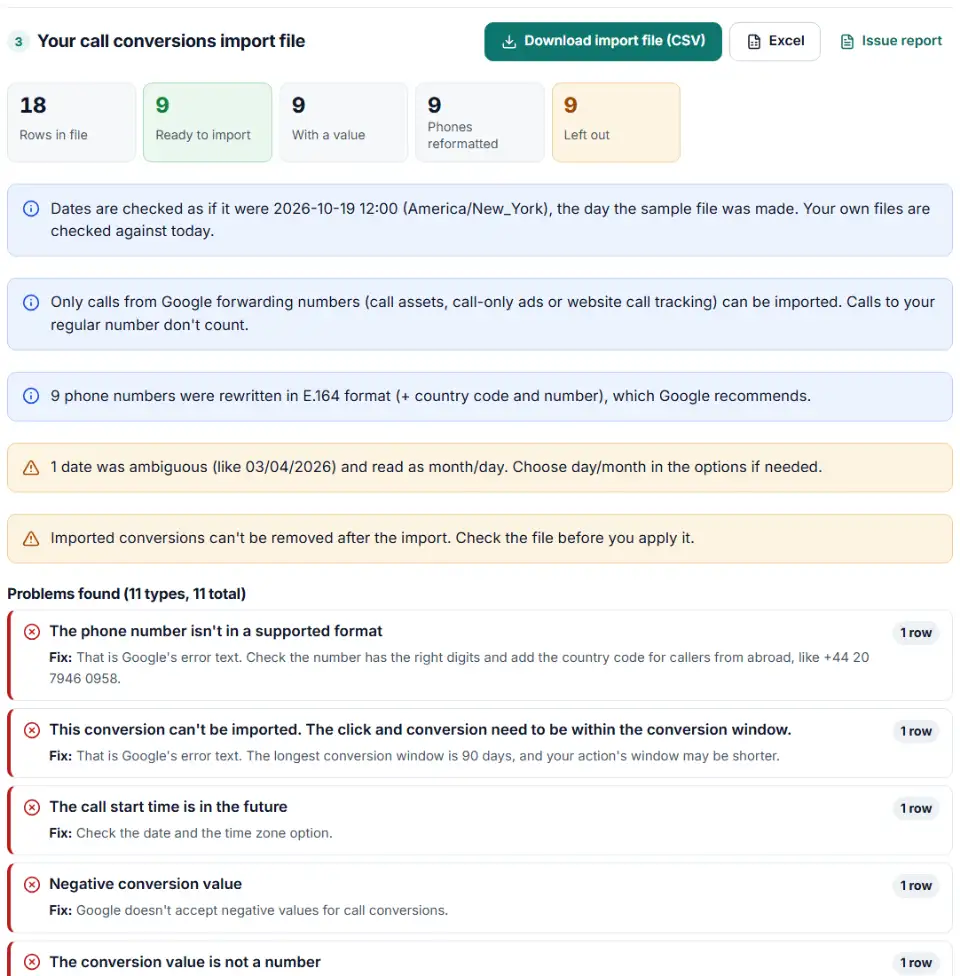
The phone number isn't in a supported format
Google couldn't read the caller's number. Common causes are missing digits, an extension, or a local number without the country code for a caller from abroad. The builder writes every valid number in E.164 and lists the ones it can't fix.
The click and conversion need to be within the conversion window
The call happened too long ago for your conversion action. The maximum window is 90 days, and you can change the window on the conversion action itself. Upload calls every week so none fall outside it.
Calls that don't match
Only calls through a Google forwarding number can be matched. If the customer dialed the number from your website without call tracking, or saw it on a sign, the row won't count.
Wrong call start time
Google matches on the start time in the right time zone. A call log in UTC uploaded as New York time is hours off. Set the time zone option to match your export.
Calls in Japan and India
Call conversion import isn't supported in Japan, and only part of the calls in India can be imported.
Upload right after creating the action fails
A new call import conversion action needs about 4 hours before Google accepts uploads for it. Wait and try again.
Frequently asked questions
Which phone calls can I import as conversions in Google Ads?
Only calls that went through a Google forwarding number: calls from call assets and call-only ads on mobile, and calls tracked on your website with a forwarding number. Calls to your regular number, dialed by hand, can’t be matched and don’t count.
What columns does the Google Ads call conversion import file need?
Google’s template has Caller’s Phone Number, Call Start Time, Conversion Name, Conversion Time, Conversion Value, Conversion Currency, Ad User Data and Ad Personalization, under a Parameters:TimeZone= row. The phone number, call start time and conversion name are the ones you must fill in.
What phone number format does Google Ads accept for the caller?
E.164 is recommended: a +, the country code and the number, like +16505551234. Google also accepts a 10-digit US number such as 6505551234, or + and a country code followed by an international number with spaces or dashes. This tool rewrites every number in E.164.
How long after a call can I import the conversion?
Within the conversion window of your call conversion action, and the longest window is 90 days. Google’s API asks you to wait 12 hours after a call before importing it, so a call from this morning may need to wait until tomorrow.
How long should I wait after creating a call import conversion action?
At least 4 hours. Imports for a brand-new conversion action can fail until Google has finished setting it up.
What do the Ad User Data and Ad Personalization columns mean?
They record the caller’s consent: whether their data may be sent to Google for advertising, and whether it may be used for ad personalization. Use Granted or Denied, or leave the cells empty when you don’t know.
Is my call log uploaded anywhere?
No. The file is read and converted in your browser, so caller numbers never leave your computer until you upload the result to Google Ads yourself.
Related tools and guide
-
Build a ready-to-upload Google Ads offline conversions CSV from your CRM export, with time zones, values and 90-day checks done for you.
Google -
Turn messy phone numbers into E.164 in bulk, with the country code added and invalid numbers flagged before you upload.
GoogleMetaTikTok -
Remove refunded sales from Google Ads or lower their value: build the adjustments file from your refunds export, with the 54-day limit checked.
Google -
Turn Google Ads upload errors like “click too old” or “conversion date precedes click date” into fixes, a clean re-upload file and a retry list.
Google -
Build the enhanced conversions for leads file for Google Ads Data Manager, with emails, phones and hashing done the way Google asks.
Google -
See how many days your customers take from ad click to sale, how many sales each conversion window would miss, and which window fits your data.
Google
Need help setting this up? Talk to EmproIT